

名称:Starfield Trainer
版本:v1.0-v1.10.31.0
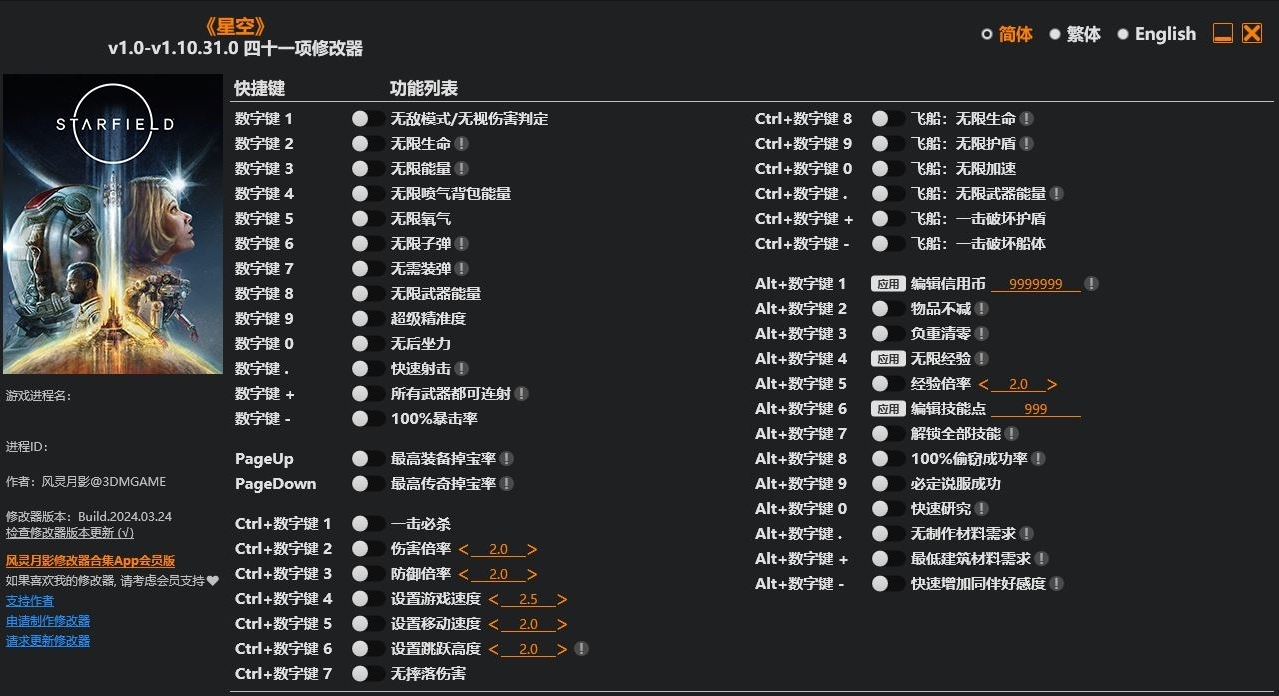
Num 1 – God Mode/Ignore Hits
Num 2 – Infinite Health
Num 3 – Infinite Power
Num 4 – Infinite Jetpack Boost
Num 5 – Infinite Oxygen
Num 6 – Infinite Ammo
Num 7 – No Reload
Num 8 – Infinite Weapon Energy
Num 9 – Super Accuracy
Num 0 – No Recoil
Num . – Rapid Fire
Num + – All Guns Become Fully Automatic
Num – – 100% Critical Chance
PageUp – Max Equipment Drop Rate
PageDown – Max Legendary Drop Rate
Ctrl+Num 1 – One Hit Kills
Ctrl+Num 2 – Damage Multiplier
Ctrl+Num 3 – Defense Multiplier
Ctrl+Num 4 – Set Game Speed
Ctrl+Num 5 – Set Movement Speed
Ctrl+Num 6 – Set Jump Height
Ctrl+Num 7 – No Fall Damage
Ctrl+Num 8 – Spaceship: Infinite Health
Ctrl+Num 9 – Spaceship: Infinite Shield
Ctrl+Num 0 – Spaceship: Infinite Boost
Ctrl+Num . – Spaceship: Infinite Weapon Energy
Ctrl+Num + – Spaceship: One Hit Destroy Shield
Ctrl+Num – – Spaceship: One Hit Destroy Hull
Alt+Num 1 – Edit Credits
Alt+Num 2 – Items Don’t Decrease
Alt+Num 3 – Zero Weight
Alt+Num 4 – Infinite Exp
Alt+Num 5 – Exp Multiplier
Alt+Num 6 – Edit Skill Points
Alt+Num 7 – Unlock All Skills
Alt+Num 8 – 100% Steal Chance
Alt+Num 9 – Persuasion Always Succeed
Alt+Num 0 – Easy Research
Alt+Num . – No Crafting Material Requirements
Alt+Num + – Minimum Building Material Requirements
Alt+Num – – Companion Affinity Always Go Up
您只能在下载文件后才能提供评论.
没有评论可显示.