跳转到内容
View in the app

A better way to browse. Learn more.

彼岸论坛

A full-screen app on your home screen with push notifications, badges and more.

To install this app on iOS and iPadOS
  1. Tap the Share icon in Safari
  2. Scroll the menu and tap Add to Home Screen.
  3. Tap Add in the top-right corner.
To install this app on Android
  1. Tap the 3-dot menu (⋮) in the top-right corner of the browser.
  2. Tap Add to Home screen or Install app.
  3. Confirm by tapping Install.
游客用户下载速度限制128kb免费注册后解除限速

终结者:暗黑命运-反抗 修改器 v1.0-v1.04+

(0篇 评论)

1张 截图

4.jpg

名称:Terminator: Dark Fate – Defiance Trainer

版本:v1.0-v1.04+
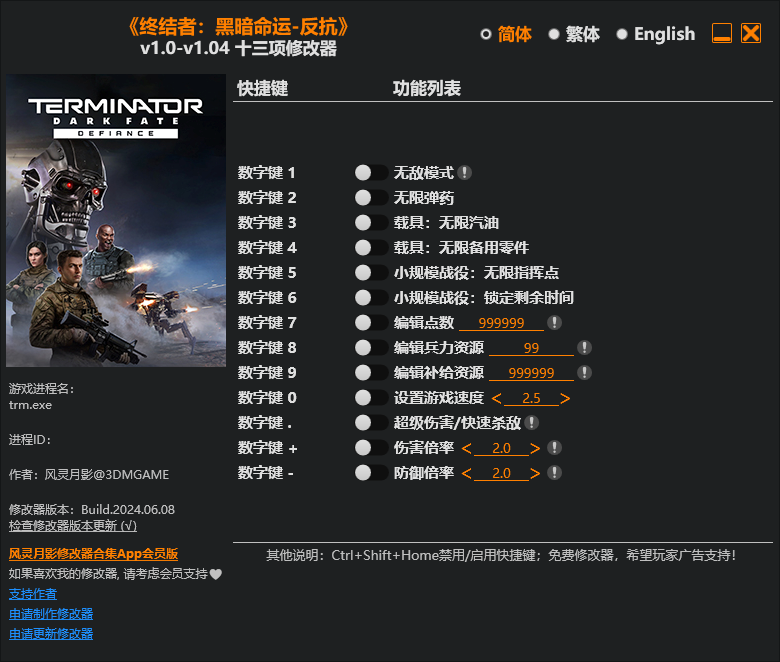
image.png.84f2167b7164cb2f33ebff988d192b1e.png

Num 1 – God Mode
Num 2 – Infinite Ammo
Num 3 – Vehicles: Infinite Fuel
Num 4 – Vehicles: Infinite Spare Parts
Num 5 – Skirmish: Infinite Command Points
Num 6 – Skirmish: Freeze Time Left
Num 7 – Edit Goodwill Points
Num 8 – Edit Manpower Resources
Num 9 – Edit Supply Resources
Num 0 – Set Game Speed
Num . – Super Damage/Fast Kills
Num + – Damage Multiplier
Num – – Defense Multiplier

用户反馈

您只能在下载文件后才能提供评论.

没有评论可显示.

Configure browser push notifications

Chrome (Android)
  1. Tap the lock icon next to the address bar.
  2. Tap Permissions → Notifications.
  3. Adjust your preference.
Chrome (Desktop)
  1. Click the padlock icon in the address bar.
  2. Select Site settings.
  3. Find Notifications and adjust your preference.