


名称:No Man’s Sky
版本:v1.5-v4.71+
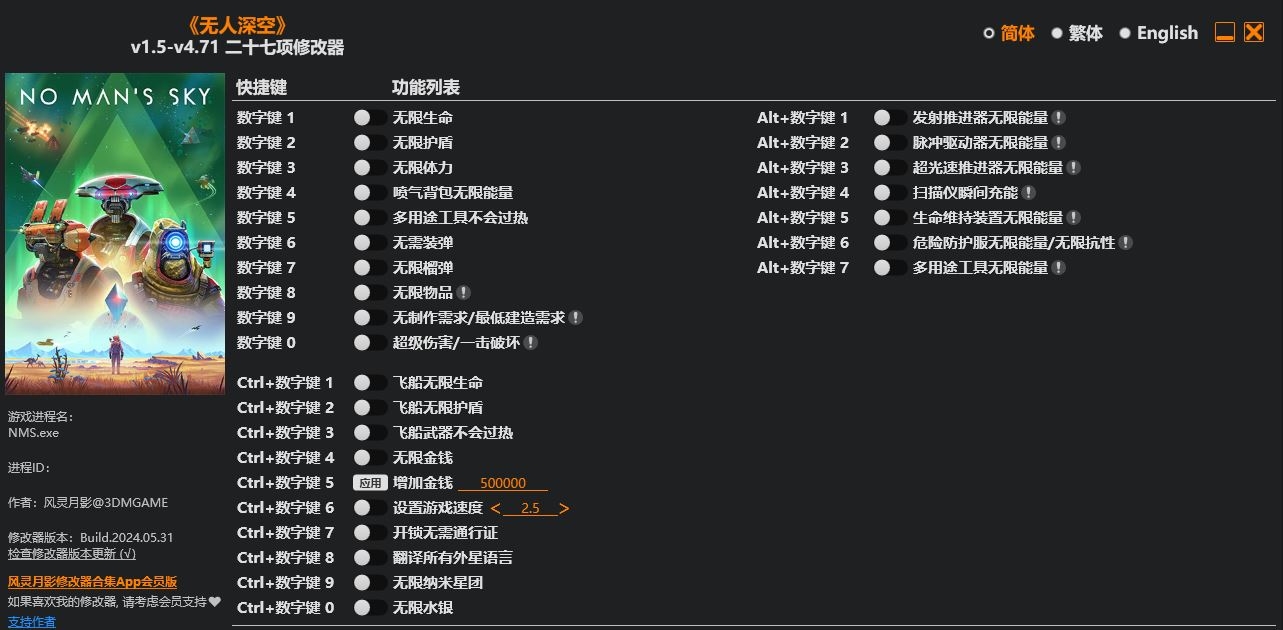
Num 1 – Infinite Health
Num 2 – Infinite Shield
Num 3 – Infinite Stamina
Num 4 – Jetpack Infinite Energy
Num 5 – Multi-Tool No Overheat
Num 6 – No Reload
Num 7 – Infinite Grenades
Num 8 – Infinite Items
Num 9 – No/Minimum Crafting Requirements
Num 0 – Super Damage/One Hit Destroy
Ctrl+Num 1 – Starship Infinite Health
Ctrl+Num 2 – Starship Infinite Shield
Ctrl+Num 3 – Starship Weapons No Overheat
Ctrl+Num 4 – Infinite Units
Ctrl+Num 5 – Add Units
Ctrl+Num 6 – Set Game Speed
Ctrl+Num 7 – Open Locks Without Atlas Pass
Ctrl+Num 8 – Translate All Alien Languages
Ctrl+Num 9 – Infinite Nanites
Ctrl+Num 0 – Infinite Quicksilver
Alt+Num 1 – Launch Thruster Infinite Energy
Alt+Num 2 – Pulse Engine Infinite Energy
Alt+Num 3 – Hyperdrive Infinite Energy
Alt+Num 4 – Scanner Instant Charge
Alt+Num 5 – Life Support Infinite Energy
Alt+Num 6 – Hazard Protection Infinite Energy
Alt+Num 7 – Multi-Tool Infinite Energy
您只能在下载文件后才能提供评论.
没有评论可显示.