
名称:Myth of Empires Trainer
版本:v1.9.3-v1.63.1+
注:仅限单人模式。
Note: Single player mode only.
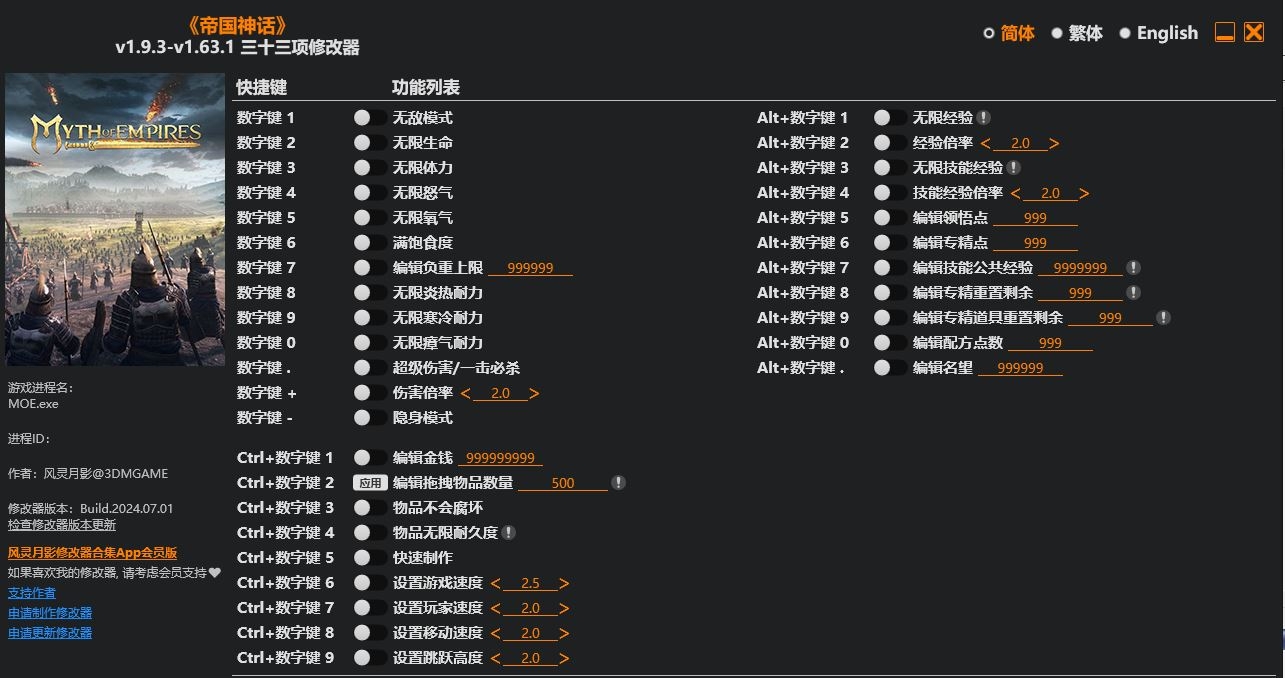
Num 1 – God Mode
Num 2 – Infinite Health
Num 3 – Infinite Stamina
Num 4 – Infinite Anger
Num 5 – Infinite Oxygen
Num 6 – Max Fullness
Num 7 – Edit Max Carry Weight
Num 8 – Infinite Heat Protection
Num 9 – Infinite Cold Protection
Num 0 – Infinite Miasma Protection
Num . – Super Damage/One Hit Kills
Num + – Damage Multiplier
Num – – Stealth Mode
Ctrl+Num 1 – Edit Money
Ctrl+Num 2 – Edit Dragged Item Amount
Ctrl+Num 3 – Items Won’t Spoil
Ctrl+Num 4 – Infinite Item Durability
Ctrl+Num 5 – Fast Crafting Speed
Ctrl+Num 6 – Set Game Speed
Ctrl+Num 7 – Set Player Speed
Ctrl+Num 8 – Set Movement Speed
Ctrl+Num 9 – Set Jump Height
Alt+Num 1 – Infinite Exp
Alt+Num 2 – Exp Multiplier
Alt+Num 3 – Infinite Skill Exp
Alt+Num 4 – Skill Exp Multiplier
Alt+Num 5 – Edit Comprehension
Alt+Num 6 – Edit Expertise Points
Alt+Num 7 – Edit Skill Common Exp
Alt+Num 8 – Edit Unspent Expertise Points
Alt+Num 9 – Edit Unspent Item Expertise Pts
Alt+Num 0 – Edit Recipe Points
Alt+Num . – Edit Honor
SPECIAL NOTES
This game uses anti-cheat protection, to launch the game without anti-cheat, please follow these instructions:
Launch the trainer before launching the game.
==================================================================================================================
这款游戏使用反作弊保护,要使用修改器需禁用反作弊,请按照以下步骤启动游戏:
先运行修改器,再运行游戏。
您只能在下载文件后才能提供评论.
没有评论可显示.