
跳转到内容
View in the app

A better way to browse. Learn more.

彼岸论坛

A full-screen app on your home screen with push notifications, badges and more.

To install this app on iOS and iPadOS
  1. Tap the Share icon in Safari
  2. Scroll the menu and tap Add to Home Screen.
  3. Tap Add in the top-right corner.
To install this app on Android
  1. Tap the 3-dot menu (⋮) in the top-right corner of the browser.
  2. Tap Add to Home screen or Install app.
  3. Confirm by tapping Install.
游客用户下载速度限制128kb免费注册后解除限速

win mtr中文版路由工具,MTR网络监测工具 1.0.0

(0篇 评论)

1张 截图

image.png

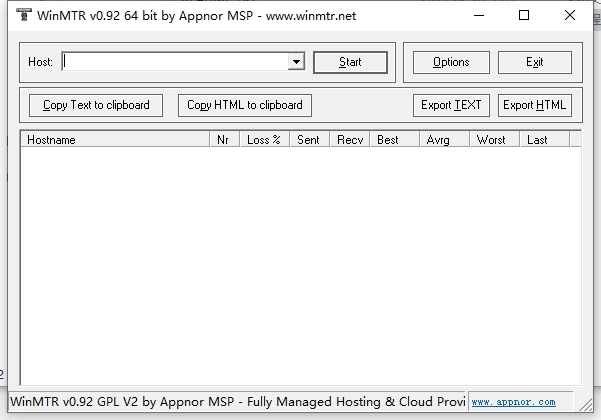
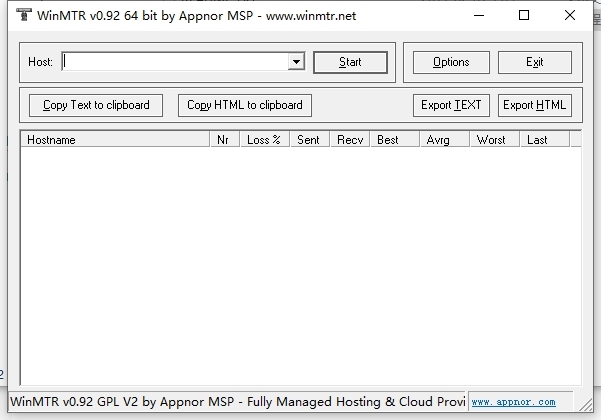
常用操作:在 host 文本框填写对方的ip或域名,再按 start ,就可以同时查看到tracetr与ping的结果该工具包括ping和tracert两种测试。具体使用方法及对照的参数如下:

hostname:到目的服务器要经过的每个主机ip或名称

nr:经过节点的数量;

loss:ping 数据包回复失败的百分比;藉此判断,那个节点(线路)出现故障,是服务器所在机房还是国际路由干路

avrg:平均回应时间

worst:回应时间的最大值

last:最后一个数据包的回应时间

sent:已传送的数据包数量

recv:成功接收的数据包数量

best:回应时间的最小值

用户反馈

您只能在下载文件后才能提供评论.

没有评论可显示.

Configure browser push notifications

Chrome (Android)
  1. Tap the lock icon next to the address bar.
  2. Tap Permissions → Notifications.
  3. Adjust your preference.
Chrome (Desktop)
  1. Click the padlock icon in the address bar.
  2. Select Site settings.
  3. Find Notifications and adjust your preference.