发表于 2024年9月11日1年前 Zgo 补货,高中低价位机子都有,任君选择 这小一个月比较稳定,希望后续一直稳下去,稳定性方面可以看我的探针: https://n.990599.xyz/ ===============9929&CMIN2 线路机型============= Los Angeles AMD VPS - Specials - Starter 1C/ 2G/ 30G SSD/ 1T/ 300mbps 1 Core AMD EPYC 7003 Series 2 GB DDR4 RAM 30G NVMe SSD 1 IPV4 & /127 IPV6 1T/Month/300Mbps, Fair Use Los Angeles, China Optimised, 9929&CMIN2 ✅含 aff 直达链接,9929&CMIN2 线路 $36 ================9929&CMIN2 线路机型============= Los Angeles AMD VPS - Specials - Standard 2C/ 3G/ 50G SSD/ 2T/ 300mbps 2 Cores AMD EPYC 7003 Series 3 GB DDR4 RAM 50G NVMe SSD 1 IPV4 & /127IPV6 2T/Month/300Mbps, Fair Use Los Angeles, China Optimised, 9929&CMIN2 ✅含 aff 直达链接,9929&CMIN2 线路 $66 =================国际线路落地解锁王=============== Los Angeles Global VPS - Specials - Starter 1C/1G/20G/2T@1000Mbps 1 Core AMD EPYC 7002 Series 1 GB DDR4 RAM 20G NVMe SSD 1 IPV4 & /127 IPV6 2T/Month/1Gbps International network, not optimized for China 无国内优化线路,适合落地 ✅性价比第二的落地鸡,含 aff 直达链接,Starter 年度付款$15(缺货) =================国际线路落地解锁王=============== Los Angeles Global VPS - Specials - Standard 2C/2G/40G/4T@1000Mbps 2 Cores AMD EPYC 7002 Series 2 GB DDR4 RAM 40G NVMe SSD 1 IPV4 & /127 IPV6 4T/Month/1Gbps International network, not optimized for China 无国内优化线路,适合落地 ✅性价比第三的落地鸡,含 aff 直达链接,Standard 年度付款$25 ===============CMIN2 线路机型=============== Los Angeles AMD Performance VPS - Specials - Lite 1C/1G/20G/600G@0.5Gbps 1 Core AMD EPYC 7003 Series 1 GB DDR4 RAM 20G NVMe SSD 1 IPV4 600G/Month/500Mbps, Fair Use Los Angeles, China Optimised, CMIN2 ✅含 aff 直达链接,CMIN2 线路 $35 =================CMIN2 线路机型================= Los Angeles AMD Performance VPS - Specials - Starter 1C/2G/30G/1000G@1Gbps 1 Core AMD EPYC 7003 Series 2 GB DDR4 RAM 30G NVMe SSD 1 IPV4 1T/Month/1Gbps, Fair Use Los Angeles, China Optimised, CMIN2 ✅含 aff 直达链接 CMIN2 线路 $52 :xhj003: AMD EPYC 7003 洛杉矶原生 IP NVMeSSD 国际网络高性能 VDS 可以选 Windows ======高性能 VDS $88 4C/8G/150G/20T@1Gbps====== Los Angeles AMD VDS - Specials - Standard 4 Cores AMD EPYC 7003 Series 8 GB DDR4 RAM 150G NVMe SSD 1 IPV4 & /127 IPV6 International network, 20T/Month/1Gbps, Fair Use Allows installation of Windows with your own license 1 Backup Slot ✅Standard 季度付款$27 ✅Standard 年度付款$88 ,有 aff 直达链接 =======高性能 VDS $166 8C/16G/250G/20T@2Gbps====== Los Angeles AMD VDS - Specials - Pro 8 Cores AMD EPYC 7003 Series 16 GB DDR4 RAM 250G NVMe SSD 1 IPV4 & /127 IPV6 International network, 20T/Month/2Gbps, Fair Use Allows installation of Windows with your own license 1 Backup Slot ✅Pro 季度付款$52 ,有 aff 直达链接 ✅Pro 年度付款$166 ,有 aff 直达链接 ======高性能 VDS $258 12C/24G/500G/20T@2Gbps====== Los Angeles AMD VDS - Specials - Premium 12 Cores AMD EPYC 7003 Series 24 GB DDR4 RAM 500G NVMe SSD 1 IPV4 & /127 IPV6 International network, 20T/Month/2Gbps, Fair Use Allows installation of Windows with your own license 1 Backup Slot ✅Premium 季度付款$76 ,有 aff 直达链接 ✅Premium 年度付款$258 ,有 aff 直达链接 =============================================== VDS 的 CPU 资源随便拉满也不会被停机,独立 CPU 可以 100%长时间占用! zgo 测评可以参考: https://990599.xyz/zgocloud/ VDS 的 test IP:154.23.243.7 VDS 的解锁测试,全绿 IP 质量测试,25 端口可以工单开启 三网回程测试,国际线路,对国内无优化,网络无抖动 融合怪脚本测试 yabs 脚本测试 zgo 洛杉矶解锁基本全绿(除了 instagram 版权音乐) zgo 测评和线路质量可以参考: https://990599.xyz/zgocloud 注意 zgocloud 开启防欺诈,请下单的环境: ⚡1 、下单前请清空缓存和 cookie ; ⚡2 、清空代理,不开启魔法,使用真实上网环境; ⚡3 、如果遇到无法支付,系统砍单的情况,可以提交工单给客服,让客服重新打开 invoice 后再付款
Zgo 补货,高中低价位机子都有,任君选择
这小一个月比较稳定,希望后续一直稳下去,稳定性方面可以看我的探针: https://n.990599.xyz/
===============9929&CMIN2 线路机型=============
Los Angeles AMD VPS - Specials - Starter
1C/ 2G/ 30G SSD/ 1T/ 300mbps
1 Core AMD EPYC 7003 Series
2 GB DDR4 RAM
30G NVMe SSD
1 IPV4 & /127 IPV6
1T/Month/300Mbps, Fair Use
Los Angeles, China Optimised, 9929&CMIN2
✅含 aff 直达链接,9929&CMIN2 线路 $36
================9929&CMIN2 线路机型=============
Los Angeles AMD VPS - Specials - Standard
2C/ 3G/ 50G SSD/ 2T/ 300mbps
2 Cores AMD EPYC 7003 Series
3 GB DDR4 RAM
50G NVMe SSD
1 IPV4 & /127IPV6
2T/Month/300Mbps, Fair Use
Los Angeles, China Optimised, 9929&CMIN2
✅含 aff 直达链接,9929&CMIN2 线路 $66
=================国际线路落地解锁王===============
Los Angeles Global VPS - Specials - Starter 1C/1G/20G/2T@1000Mbps
1 Core AMD EPYC 7002 Series
1 GB DDR4 RAM
20G NVMe SSD
1 IPV4 & /127 IPV6
2T/Month/1Gbps
International network, not optimized for China
无国内优化线路,适合落地
✅性价比第二的落地鸡,含 aff 直达链接,Starter 年度付款$15(缺货)
=================国际线路落地解锁王===============
Los Angeles Global VPS - Specials - Standard 2C/2G/40G/4T@1000Mbps
2 Cores AMD EPYC 7002 Series
2 GB DDR4 RAM
40G NVMe SSD
1 IPV4 & /127 IPV6
4T/Month/1Gbps
International network, not optimized for China 无国内优化线路,适合落地
✅性价比第三的落地鸡,含 aff 直达链接,Standard 年度付款$25
===============CMIN2 线路机型===============
Los Angeles AMD Performance VPS - Specials - Lite
1C/1G/20G/600G@0.5Gbps
1 Core AMD EPYC 7003 Series
1 GB DDR4 RAM
20G NVMe SSD
1 IPV4
600G/Month/500Mbps, Fair Use
Los Angeles, China Optimised, CMIN2
✅含 aff 直达链接,CMIN2 线路 $35
=================CMIN2 线路机型=================
Los Angeles AMD Performance VPS - Specials - Starter
1C/2G/30G/1000G@1Gbps
1 Core AMD EPYC 7003 Series
2 GB DDR4 RAM
30G NVMe SSD
1 IPV4
1T/Month/1Gbps, Fair Use
Los Angeles, China Optimised, CMIN2
✅含 aff 直达链接 CMIN2 线路 $52
:xhj003: AMD EPYC 7003 洛杉矶原生 IP NVMeSSD 国际网络高性能 VDS 可以选 Windows
======高性能 VDS $88 4C/8G/150G/20T@1Gbps======
Los Angeles AMD VDS - Specials - Standard
4 Cores AMD EPYC 7003 Series
8 GB DDR4 RAM
150G NVMe SSD
1 IPV4 & /127 IPV6
International network, 20T/Month/1Gbps, Fair Use
Allows installation of Windows with your own license
1 Backup Slot
✅Standard 季度付款$27 ✅Standard 年度付款$88 ,有 aff 直达链接
=======高性能 VDS $166 8C/16G/250G/20T@2Gbps======
Los Angeles AMD VDS - Specials - Pro
8 Cores AMD EPYC 7003 Series
16 GB DDR4 RAM
250G NVMe SSD
1 IPV4 & /127 IPV6
International network, 20T/Month/2Gbps, Fair Use
Allows installation of Windows with your own license
1 Backup Slot ✅Pro 季度付款$52 ,有 aff 直达链接 ✅Pro 年度付款$166 ,有 aff 直达链接
======高性能 VDS $258 12C/24G/500G/20T@2Gbps======
Los Angeles AMD VDS - Specials - Premium
12 Cores AMD EPYC 7003 Series
24 GB DDR4 RAM
500G NVMe SSD
1 IPV4 & /127 IPV6
International network, 20T/Month/2Gbps, Fair Use
Allows installation of Windows with your own license
1 Backup Slot ✅Premium 季度付款$76 ,有 aff 直达链接 ✅Premium 年度付款$258 ,有 aff 直达链接
===============================================
VDS 的 CPU 资源随便拉满也不会被停机,独立 CPU 可以 100%长时间占用!
zgo 测评可以参考: https://990599.xyz/zgocloud/
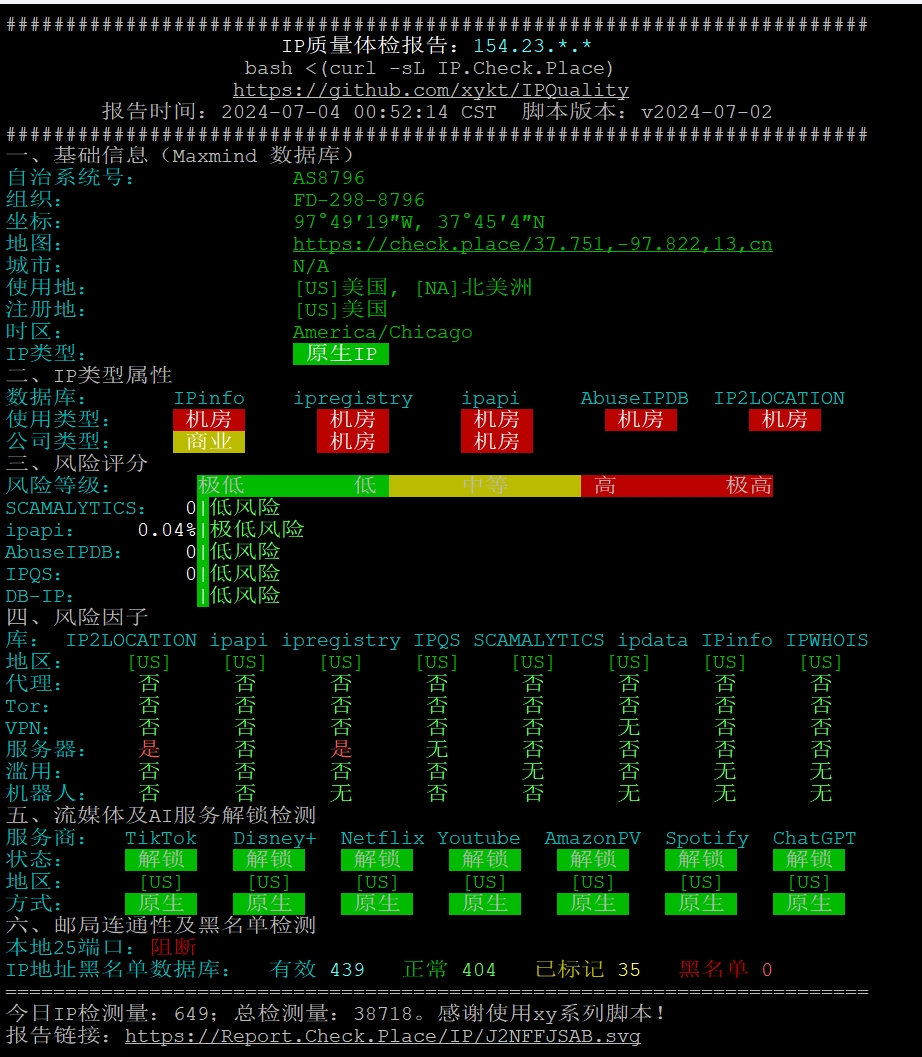
VDS 的 test IP:154.23.243.7 VDS 的解锁测试,全绿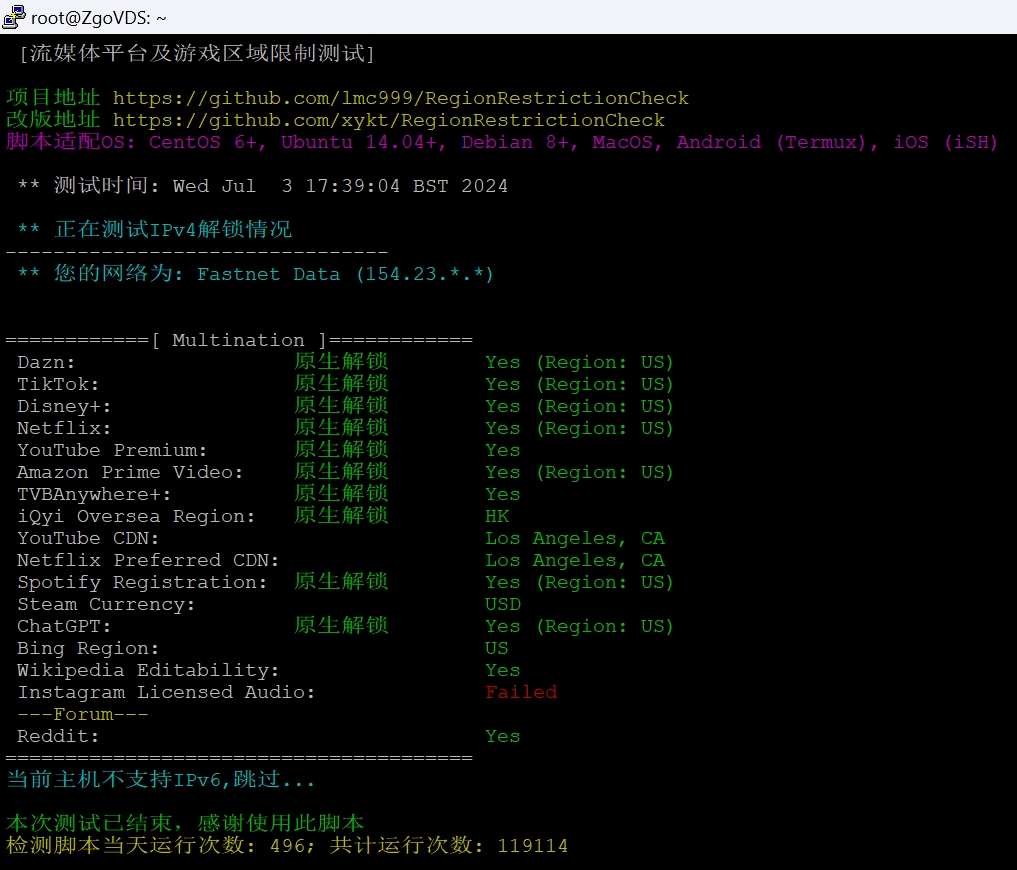 IP 质量测试,25 端口可以工单开启
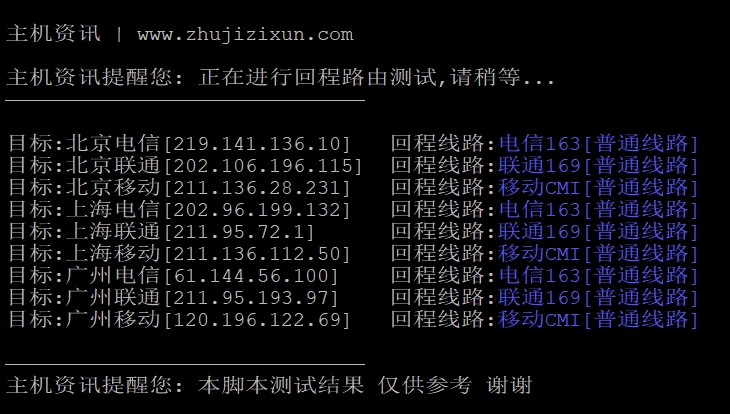
 三网回程测试,国际线路,对国内无优化,网络无抖动
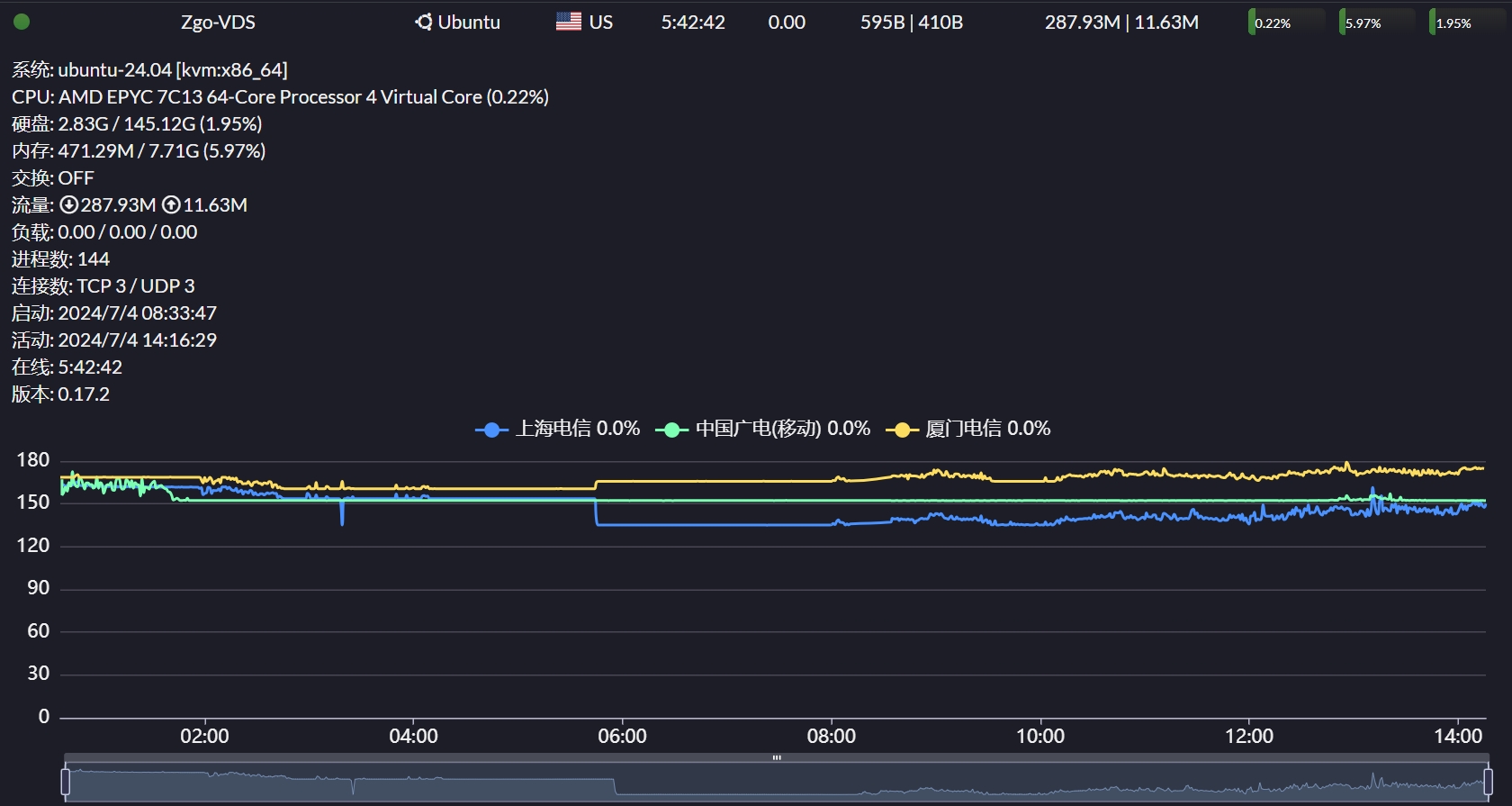
融合怪脚本测试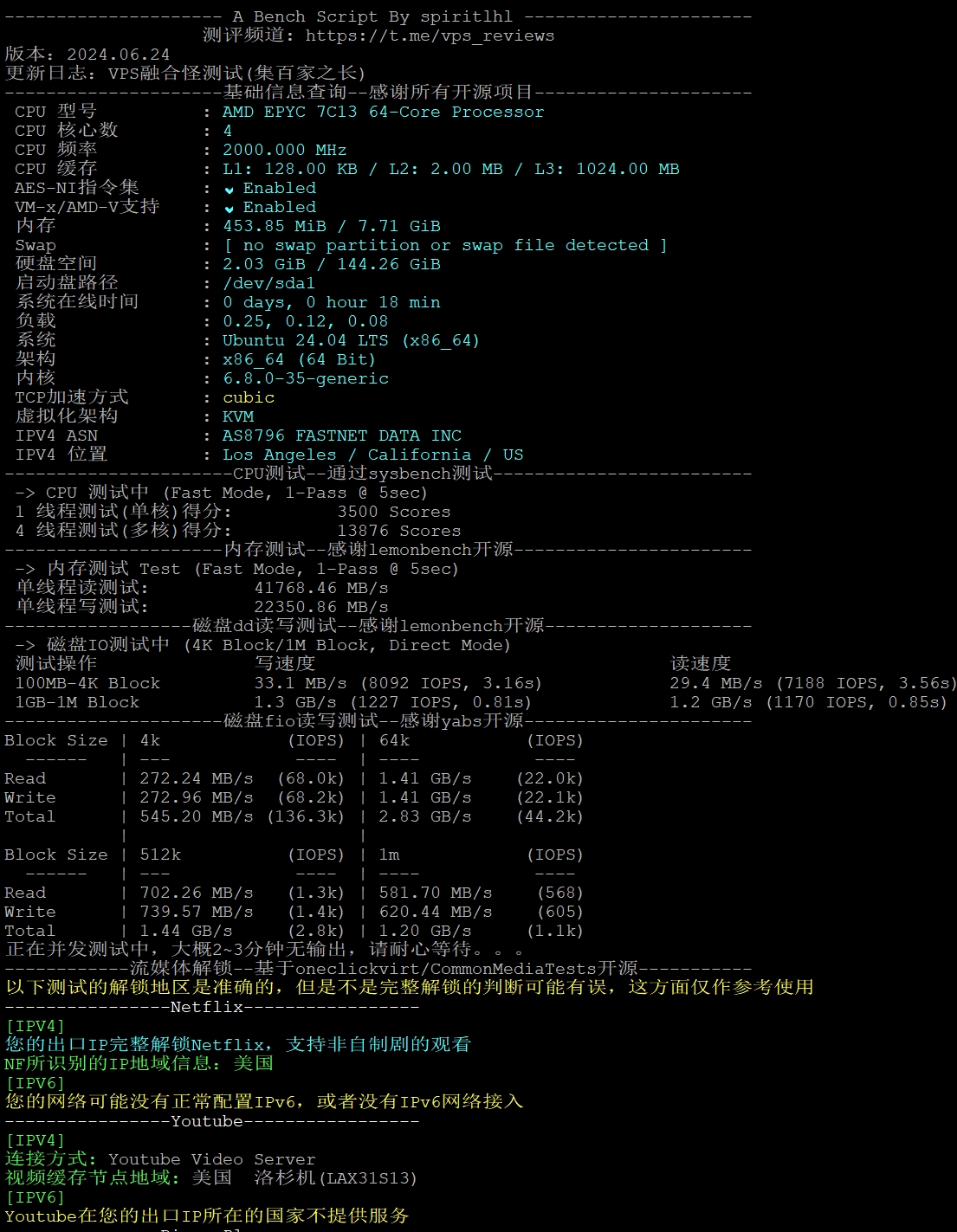
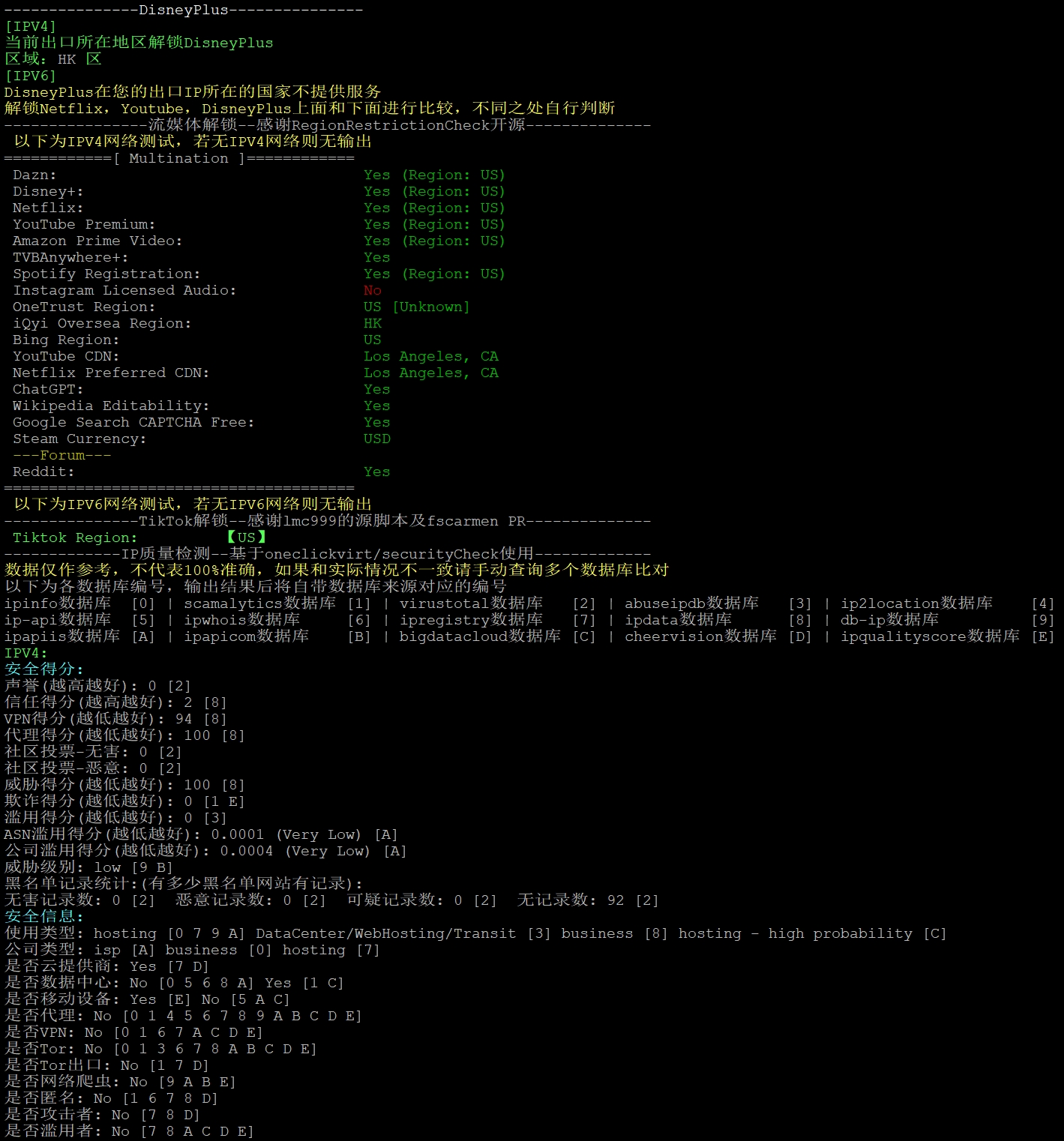
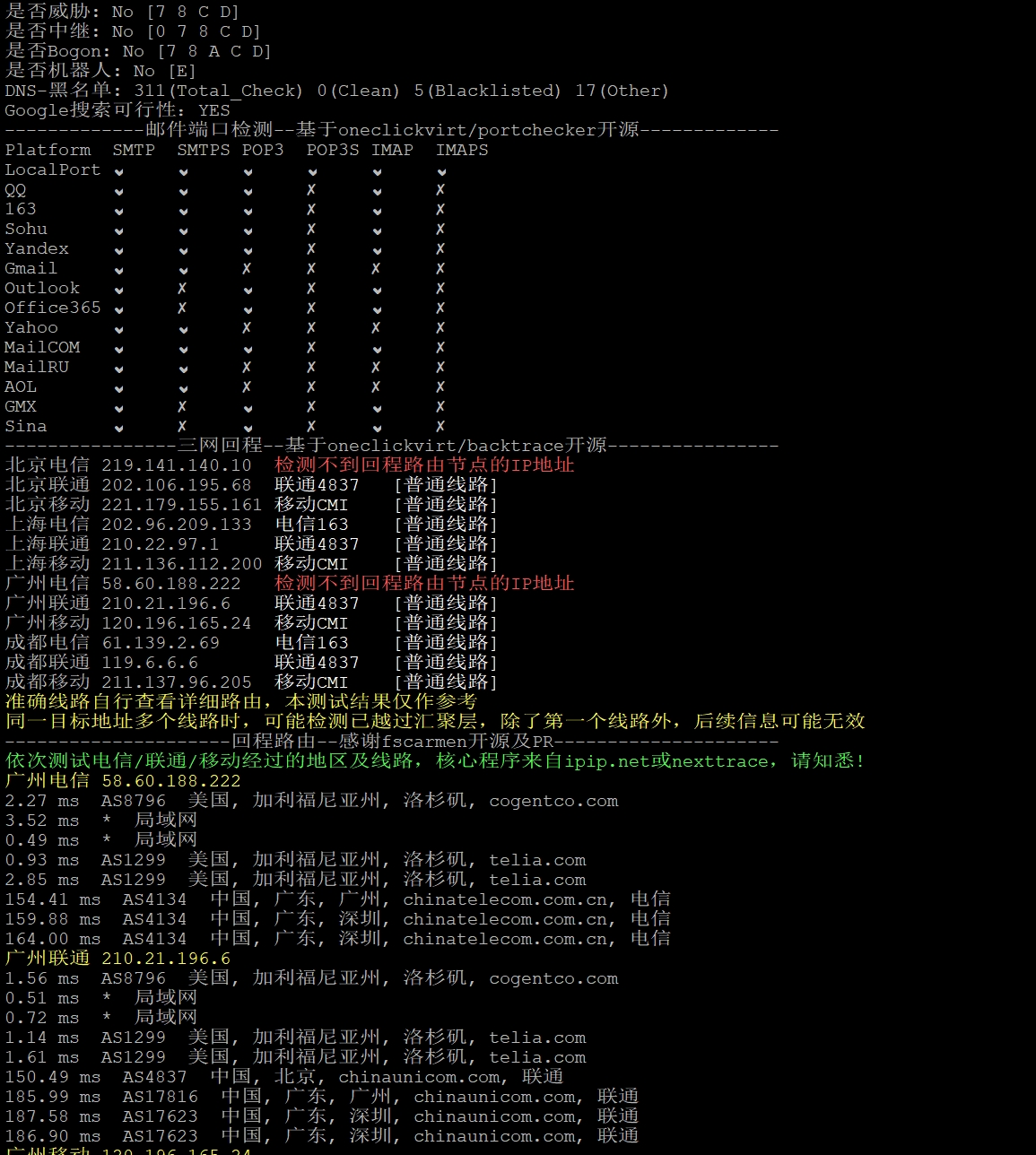
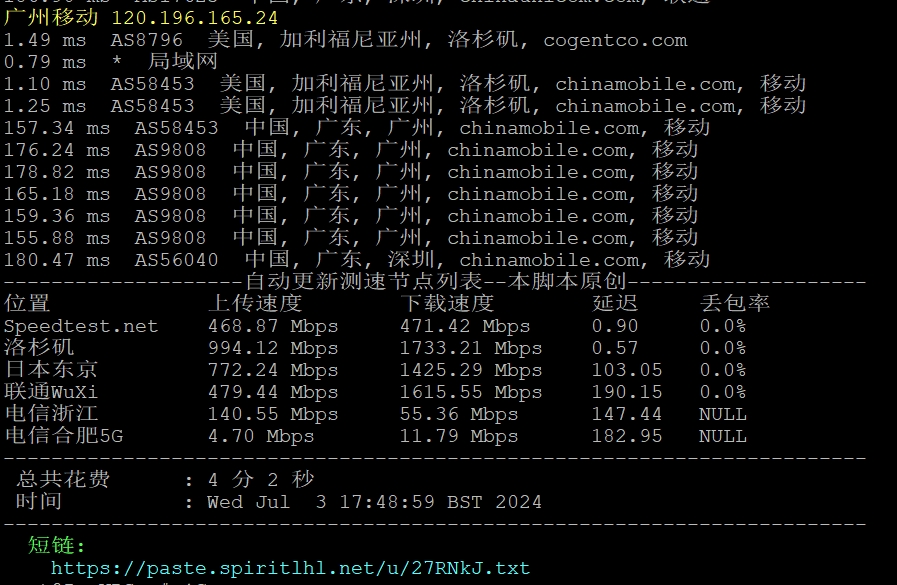
yabs 脚本测试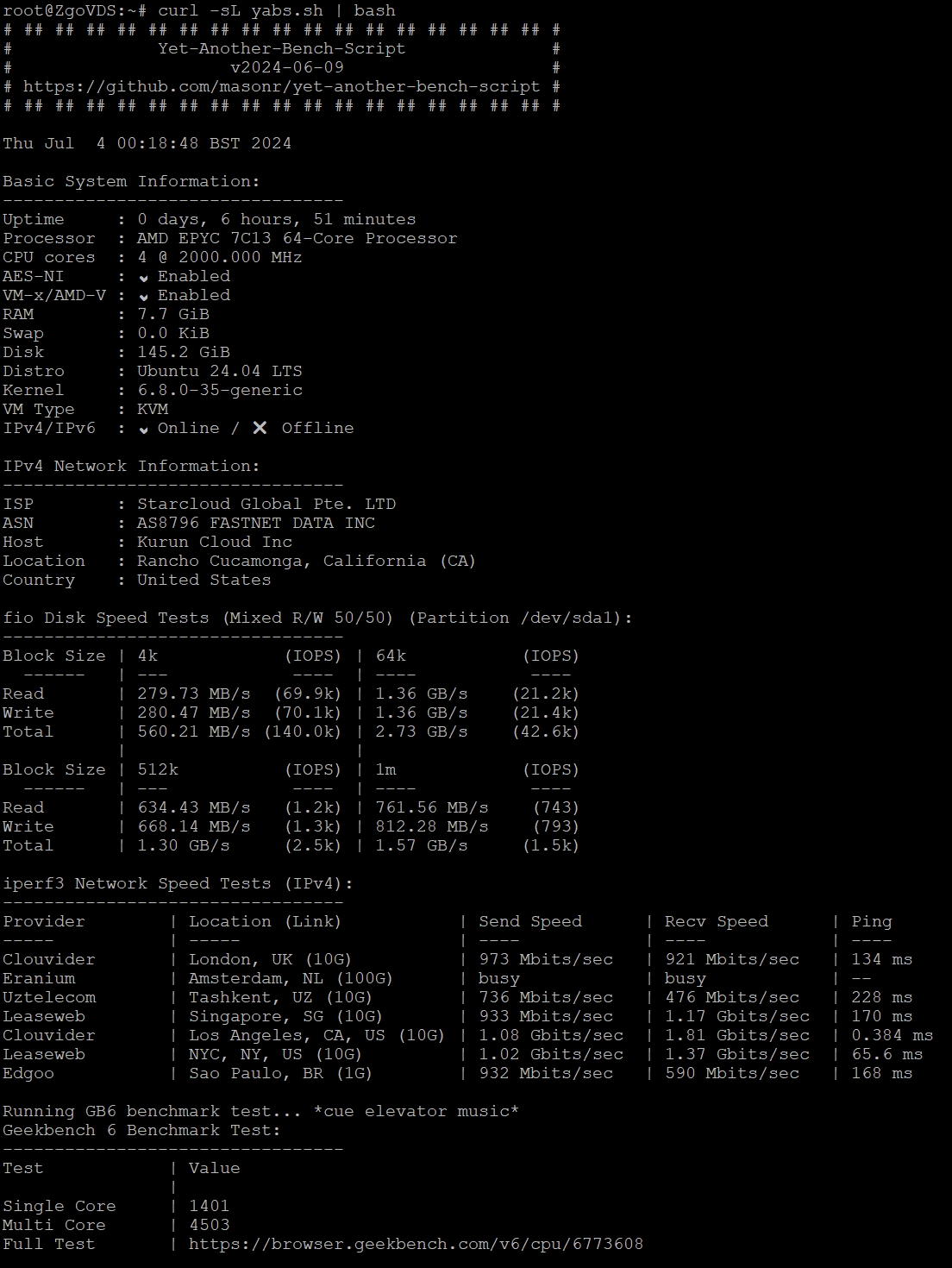
zgo 洛杉矶解锁基本全绿(除了 instagram 版权音乐) zgo 测评和线路质量可以参考: https://990599.xyz/zgocloud
注意 zgocloud 开启防欺诈,请下单的环境:
⚡1 、下单前请清空缓存和 cookie ;
⚡2 、清空代理,不开启魔法,使用真实上网环境;
⚡3 、如果遇到无法支付,系统砍单的情况,可以提交工单给客服,让客服重新打开 invoice 后再付款