跳转到内容
View in the app

A better way to browse. Learn more.

彼岸论坛

A full-screen app on your home screen with push notifications, badges and more.

To install this app on iOS and iPadOS
  1. Tap the Share icon in Safari
  2. Scroll the menu and tap Add to Home Screen.
  3. Tap Add in the top-right corner.
To install this app on Android
  1. Tap the 3-dot menu (⋮) in the top-right corner of the browser.
  2. Tap Add to Home screen or Install app.
  3. Confirm by tapping Install.
欢迎抵达彼岸 彼岸花开 此处谁在 -彼岸论坛

[分享创造] [送码] 便签 Pro:Mac/ iPhone 便签同步神器,送价值 99 元的永久兑换码

发表于

便签 Pro 迎来 3.0 更新,提供给所有用户 3 天免费试用权,以及送永久对话码活动

👉 Features:

  • iCloud 同步,iPhone 、iPad 、Mac 都可以编辑
  • 六种便签颜色可选择
  • 自动高度,根据内容高度修改边框高度
  • 缩小为标签,减小体积

⬇️ 点击下载

激活码使用教程

一、运行「便签 Pro 」后,依次点击菜单栏「 Stickies Pro > 设置… > 获取 Plus 版本」按钮: img1
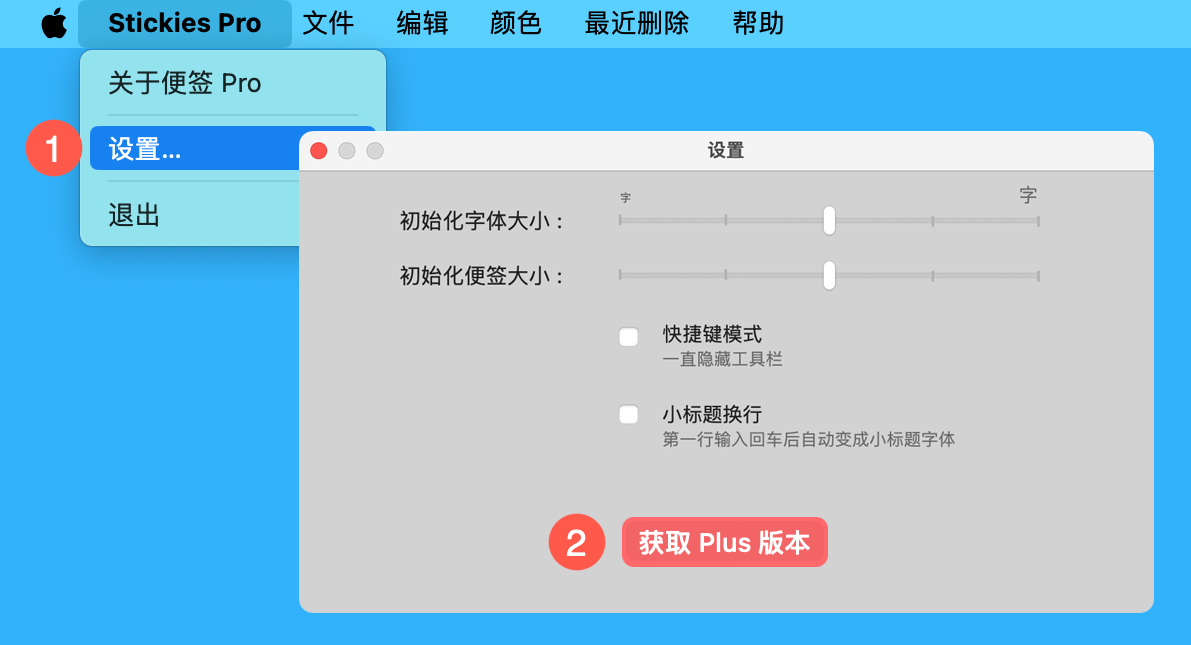
二、在弹窗中点击右下角的「恢复购买」按钮,在输入框中粘贴激活码,点击「使用兑换码」即可解锁全部功能。

img1

⬇️点击下载

Featured Replies

No posts to show

创建帐户或登录来提出意见

Configure browser push notifications

Chrome (Android)
  1. Tap the lock icon next to the address bar.
  2. Tap Permissions → Notifications.
  3. Adjust your preference.
Chrome (Desktop)
  1. Click the padlock icon in the address bar.
  2. Select Site settings.
  3. Find Notifications and adjust your preference.