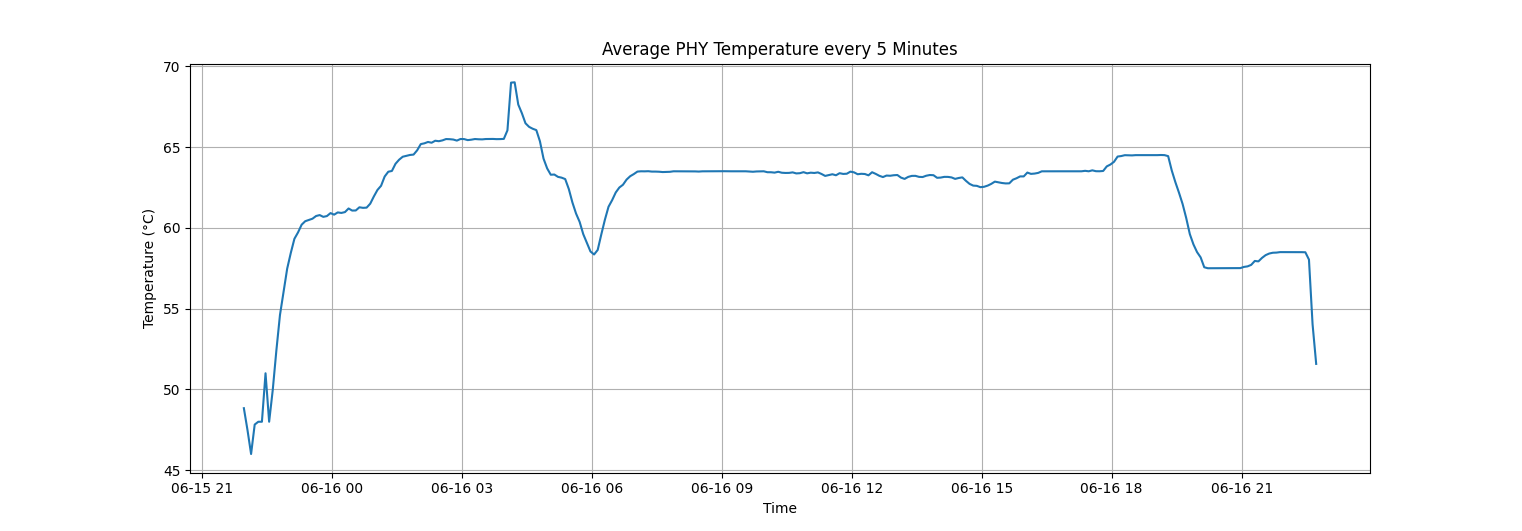
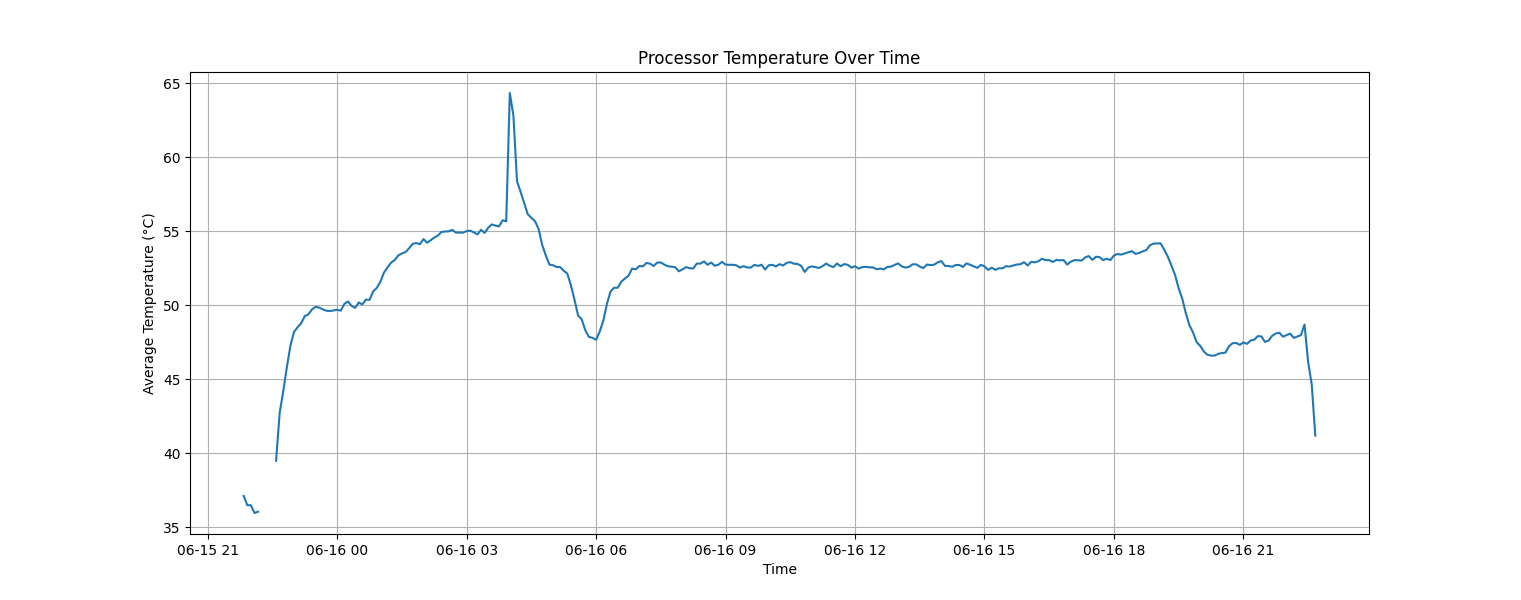
发表于 2024年6月16日1年前 测试背景介绍(防杠说明):打流崩在了第 85946.00-85947.00 秒之间,暂时不确定是我 M2 Mac mini 上的原生的万兆网卡疲劳了还是有板载 AQC113C-B1-C 的设备网卡疲劳了。本次测试环境为室温 26-29 之间(人在就开空调,人走关空调,深圳闷热暴雨天。)测试不是非常严谨,但是完全模拟了家用场景或办公场景。 一、测试设备: Mac mini (M2 芯片)带原生万兆(官网选配)—— 运行 iperf3 -c 192.168.1.1 -t 86400 板载双 AQC113-B1-C 支持 6 速自动协商的万兆低功耗主板(处理器 Alder Lake-N N100 ) —— 运行 iperf3 -s 固件(未开源):Lean 专门为 AQC 万兆网卡,Intel 万兆网卡,RTL8126-CG 5Gbps 网卡适配驱动的 OP 固件 二、测试结果: 中止方式:看到网速不正常后手动终止。测试全过程持续打流传输了 91.6 TBytes ,测试过程没有作任何优化测试,主打一个小白插网线直接测试。手动终止后重新跑了 180 秒打流,速度又正常,怀疑是网卡疲劳了,差 600 秒不到就真正持续了 24 个小时稳定运行。 服务端: 客户端: 三、测试日志: 在打流测试的全过程,我用一段 shell 脚本记录了整个过程的系统关键系统的参数表现。日志文件共享在 GitHub 上,喜欢研究的老哥,自行研究。 日志时区非东八区。 测试脚本:GitHub 测试日志:Mac 端Server 端监控脚本日志(文件超过 50MB ,上传到 GoogleDrive ) 数据化呈现: 每 5 分钟的数据求平均数后取样一次。两“V”字阶段,应该是我在场时开空调的时候的表现,空调为 26 度。 CPU 的温度曲线图: PHY 网卡的温度曲线图:
一、测试设备:
—— 运行
iperf3 -c 192.168.1.1 -t 86400—— 运行
iperf3 -s二、测试结果:
三、测试日志:
Mac 端
Server 端监控脚本日志(文件超过 50MB ,上传到 GoogleDrive )
数据化呈现:
CPU 的温度曲线图:
PHY 网卡的温度曲线图: