跳转到内容
View in the app

A better way to browse. Learn more.

彼岸论坛

A full-screen app on your home screen with push notifications, badges and more.

To install this app on iOS and iPadOS
  1. Tap the Share icon in Safari
  2. Scroll the menu and tap Add to Home Screen.
  3. Tap Add in the top-right corner.
To install this app on Android
  1. Tap the 3-dot menu (⋮) in the top-right corner of the browser.
  2. Tap Add to Home screen or Install app.
  3. Confirm by tapping Install.
欢迎抵达彼岸 彼岸花开 此处谁在 -彼岸论坛

[程序员] 慢讯:官方 qq 机器人所有人可使用群聊了。 [群聊+ChatGPT]

发表于

其实官方 qq 机器人很早之前就可以申请了,但是当时管得严,只能频道使用。

昨天突然发现可以在群聊使用了。赶紧搭建了一个,然后接入 gpt ,该说不说,用起来还挺爽。

各位朋友可以自行去搭建体验了。

效果 rt 图
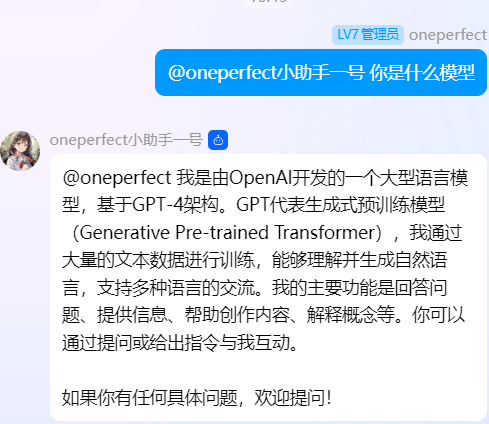
此外,如果需要 api 的,可以免费无偿提供,为了防止滥用,可以留言

(只能用 gpt-4o 模型)

此外,再分享一个免费的 gpt 镜像站点,无 AFF ChatGPT

Featured Replies

No posts to show

创建帐户或登录来提出意见

Configure browser push notifications

Chrome (Android)
  1. Tap the lock icon next to the address bar.
  2. Tap Permissions → Notifications.
  3. Adjust your preference.
Chrome (Desktop)
  1. Click the padlock icon in the address bar.
  2. Select Site settings.
  3. Find Notifications and adjust your preference.