发表于 2024年10月5日1年前 之前一直是按照那是云的这篇文章设置的,http://www.nasyun.com/thread-77024-1-1.html#:~:text=%E6%96%B9%E4%BE%BFqBittorr 网页 2022 年 5 月 18 日 — 方便 qBittorrent 下载完成后 做种和刮削,搞了个脚本来自动按分类文件,创建视频文件硬链接。 主要 为了解决*.nfo 文件和海报图片 可惜这篇文章打不开了。 问一下大佬,qBittorrent 需要怎么设置? #!/bin/bash set -x #qBittorrent 命令参数: #qBittorrent %N:Torrent 名称 #qBittorrent %F:内容路径(与多文件 torrent 的根目录相同) #qBittorrent %L:分类 #qBittorrent %G:标签(以逗号分隔) #qBittorrent %R:根目录(第一个 torrent 的子目录路径) #qBittorrent %D:保存路径 #qBittorrent %C:文件数 #qBittorrent %Z:Torrent 大小(字节) #qBittorrent %T:当前 tracker #qBittorrent %I:哈希值 #在 qBittorrent 分别按如上顺序键入参数,ex:/downloads/qbittorrent.sh "%N" "%F" "%L" #设置想保存的位置 your_path=/downloads/link #获取种子名称 torrent_name="$1" #获取种子路径 torrent_path="$2" #获取种子分类 torrent_category="$3" #根据分类、种子路径类型创建保存路径 link_path_directory="$your_path"/"$3" link_path_file="$your_path"/"$3"/"$1" tmp_path="$your_path"/"$3"/tempfile #清空临时目录 rm -rf "$tmp_path"/ #只对电影和电视剧分类的常见电影文件创建软连接 if [[ "$torrent_category" == "study" || "$torrent_category" == "book" || "$torrent_category" == "animetv" || "$torrent_category" == "music" ]]; then #判断种子路径是目录还是文件夹 if [ -d "$torrent_path" ]; then mkdir -p "$tmp_path" cp -lR "$torrent_path"/ "$tmp_path"/ find "$tmp_path"/ -type f -regextype posix-extended -regex "..(mp4|avi|mkv|rmvb|mov|rm|mpeg)" -print0 | xargs -0 -i rm -f {} cp -R "$tmp_path"/ "$link_path_directory"/ cp -lnR "$torrent_path"/ "$link_path_directory"/ rm -rf "$tmp_path"/ #删除链接的*.nfo 元数据文件 #find "$link_path_file" -regextype posix-extended -regex "..(nfo)" -print0 | xargs -0 -i rm {} #仅链接指定类型文件,默认是链接全部文件 #find "$torrent_path" -regextype posix-extended -regex "..(mp4|avi|mkv|rmvb|mov|rm|mpeg|ass|srt|nfo)" -print0 | xargs -0 -i cp -lR {} "$link_path_directory" elif [ -f "$torrent_path" ]; then #创建链接文件夹 mkdir -p "$link_path_file"/ #仅链接指定类型文件,默认是链接全部文件 #find "$torrent_path" -regextype posix-extended -regex ".*.(p4|avi|mkv|rmvb|mov|rm|mpeg|ass|srt|nfo)" -print0 | xargs -0 -i cp -lR {} "$link_path_file" cp -lR "$torrent_path" "$link_path_file"/ fi fi
之前一直是按照那是云的这篇文章设置的,http://www.nasyun.com/thread-77024-1-1.html#:~:text=%E6%96%B9%E4%BE%BFqBittorr 网页 2022 年 5 月 18 日 — 方便 qBittorrent 下载完成后 做种和刮削,搞了个脚本来自动按分类文件,创建视频文件硬链接。 主要 为了解决*.nfo 文件和海报图片 可惜这篇文章打不开了。 问一下大佬,qBittorrent 需要怎么设置?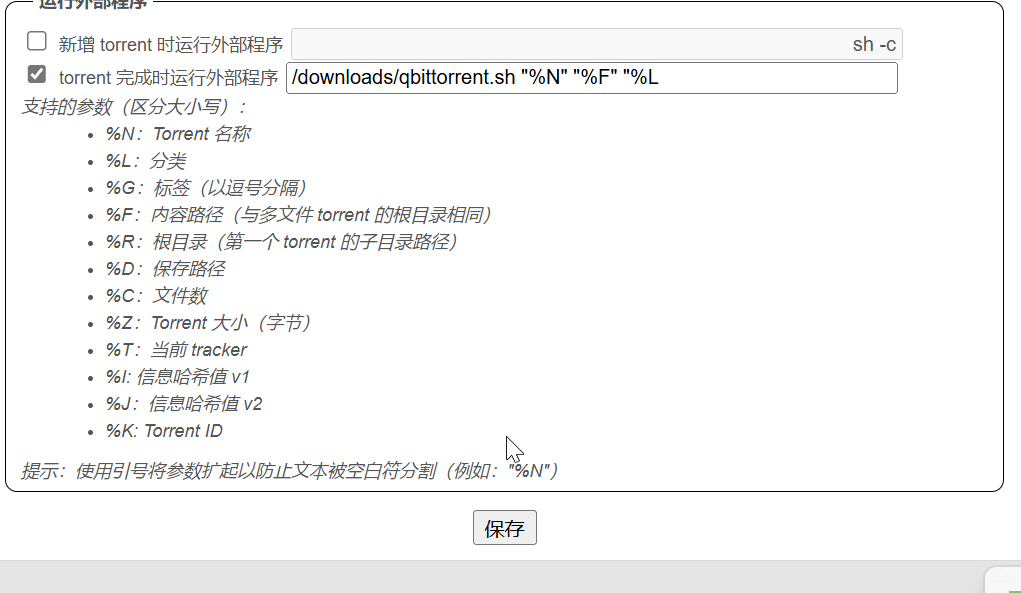
#!/bin/bash set -x #qBittorrent 命令参数: #qBittorrent %N:Torrent 名称 #qBittorrent %F:内容路径(与多文件 torrent 的根目录相同) #qBittorrent %L:分类 #qBittorrent %G:标签(以逗号分隔) #qBittorrent %R:根目录(第一个 torrent 的子目录路径) #qBittorrent %D:保存路径 #qBittorrent %C:文件数 #qBittorrent %Z:Torrent 大小(字节) #qBittorrent %T:当前 tracker #qBittorrent %I:哈希值 #在 qBittorrent 分别按如上顺序键入参数,ex:/downloads/qbittorrent.sh "%N" "%F" "%L"
#设置想保存的位置 your_path=/downloads/link #获取种子名称 torrent_name="$1" #获取种子路径 torrent_path="$2" #获取种子分类 torrent_category="$3" #根据分类、种子路径类型创建保存路径 link_path_directory="$your_path"/"$3" link_path_file="$your_path"/"$3"/"$1" tmp_path="$your_path"/"$3"/tempfile #清空临时目录 rm -rf "$tmp_path"/
#只对电影和电视剧分类的常见电影文件创建软连接 if [[ "$torrent_category" == "study" || "$torrent_category" == "book" || "$torrent_category" == "animetv" || "$torrent_category" == "music" ]]; then #判断种子路径是目录还是文件夹 if [ -d "$torrent_path" ]; then mkdir -p "$tmp_path" cp -lR "$torrent_path"/ "$tmp_path"/ find "$tmp_path"/ -type f -regextype posix-extended -regex "..(mp4|avi|mkv|rmvb|mov|rm|mpeg)" -print0 | xargs -0 -i rm -f {} cp -R "$tmp_path"/ "$link_path_directory"/ cp -lnR "$torrent_path"/ "$link_path_directory"/ rm -rf "$tmp_path"/ #删除链接的*.nfo 元数据文件 #find "$link_path_file" -regextype posix-extended -regex "..(nfo)" -print0 | xargs -0 -i rm {} #仅链接指定类型文件,默认是链接全部文件 #find "$torrent_path" -regextype posix-extended -regex "..(mp4|avi|mkv|rmvb|mov|rm|mpeg|ass|srt|nfo)" -print0 | xargs -0 -i cp -lR {} "$link_path_directory" elif [ -f "$torrent_path" ]; then #创建链接文件夹 mkdir -p "$link_path_file"/ #仅链接指定类型文件,默认是链接全部文件 #find "$torrent_path" -regextype posix-extended -regex ".*.(p4|avi|mkv|rmvb|mov|rm|mpeg|ass|srt|nfo)" -print0 | xargs -0 -i cp -lR {} "$link_path_file" cp -lR "$torrent_path" "$link_path_file"/ fi fi