发表于 2025年3月26日1年前 本地调试WordPress时,为了保证代码的正确性,插件和主题作者往往会打开wp-config.php里的WP_DEBUG开关。如果您不知道这个开关,就不要往下看了。define('WP_DEBUG', true);这样PHP运行时的错误和警告就会以醒目的字体直接打印到网页上。但是这样会带来一个程序员的日经问题:是我的BUG我改,不是我的BUG莫挨老子!按说WP这种成熟的产品是不会让用户看到警告和错误的。但是,由于众所周知的原因,WP内核、主题和插件升级所需要的WordPress的官网wordpress.org时灵时不灵,连不上的时候就会显示大面积的警告信息。安装完成以后,后台这种需要连接到wordpress.org的地方大抵有4种:core update、theme update、 plugin update和translation api,出现在后台Dashboard、 Plugin、 Theme、 和Settings页面。其中Dashboard会调用前三种Update,Settings四种都会调用。这些信息不仅是影响对于出错代码的判断(比如图中提示的“Cannot modify header information”,其实根本就不是本地header的问题),还会直接影响页面元素的渲染和操作。那就必须要干掉它!再次更新,define('WP_HTTP_BLOCK_EXTERNAL', true);这个宏屁用没用,还是得用我下面的方法。开整。//下面的action钩子调用的早,所以在加载主题或插件的时候就要直接remove掉,否则没机会了。 if ( defined( 'WP_DEBUG' ) && WP_DEBUG ) { remove_action('admin_init', '_maybe_update_core'); remove_action('admin_init', '_maybe_update_plugins'); remove_action('admin_init', '_maybe_update_themes'); remove_action('init', 'wp_schedule_update_checks'); //translations_api默认会返回false,之后会访问wordpress.org,返回空数组之后就不访问了。 //Since 4.0.0 add_filter('translations_api', '__return_empty_array'); } //调试者作为admin,默认是有各种update权限的。这里令各种内部调用user_has_cap询问4种权限的结果强行置为false。 function _debug_ignore_wp_request ($allcaps, $caps, $args){ $server_caps = array('install_languages', 'update_themes', 'update_plugins', 'update_core'); foreach ($caps as $cap) { if ( in_array($cap, $server_caps)) { $allcaps[$cap] = false; } } return $allcaps; } function my_admin_init { if ( defined( 'WP_DEBUG' ) && WP_DEBUG ) { //下面的钩子很多不能移除得太早。 //宁杀错不放过。 remove_action('upgrader_process_complete', 'wp_update_plugins'); remove_action('upgrader_process_complete', 'wp_update_themes'); remove_action('load-plugins.php', 'wp_plugin_update_rows', 20); remove_action('load-themes.php', 'wp_theme_update_rows', 20); remove_action('load-plugins.php', 'wp_update_plugins'); remove_action('load-themes.php', 'wp_update_themes'); wp_unschedule_hook('wp_version_check'); wp_unschedule_hook('wp_update_plugins'); wp_unschedule_hook('wp_update_themes'); remove_action('wp_version_check', 'wp_version_check'); remove_action('load-plugins.php', 'wp_update_plugins'); remove_action('load-update.php', 'wp_update_plugins'); remove_action('load-update-core.php', 'wp_update_plugins'); remove_action('wp_update_plugins', 'wp_update_plugins'); remove_action('load-themes.php', 'wp_update_themes'); remove_action('load-update.php', 'wp_update_themes'); remove_action('load-update-core.php', 'wp_update_themes'); remove_action('wp_update_themes', 'wp_update_themes'); remove_action('update_option_WPLANG', 'wp_clean_update_cache', 10, 0); remove_action('wp_maybe_auto_update', 'wp_maybe_auto_update'); add_filter('user_has_cap', '_debug_ignore_wp_request', 10, 3); } } add_action('admin_init','my_admin_init');完事。这个世界清净了。
本地调试WordPress时,为了保证代码的正确性,插件和主题作者往往会打开wp-config.php里的WP_DEBUG开关。如果您不知道这个开关,就不要往下看了。
这样PHP运行时的错误和警告就会以醒目的字体直接打印到网页上。
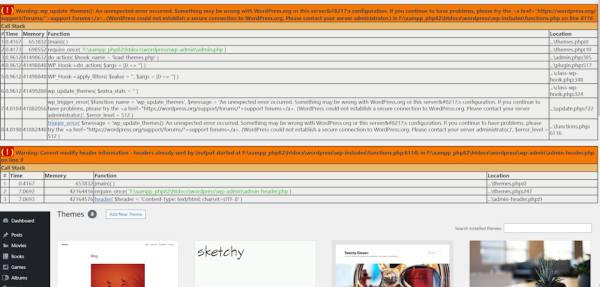
但是这样会带来一个程序员的日经问题:是我的BUG我改,不是我的BUG莫挨老子!
按说WP这种成熟的产品是不会让用户看到警告和错误的。但是,由于众所周知的原因,WP内核、主题和插件升级所需要的WordPress的官网wordpress.org时灵时不灵,连不上的时候就会显示大面积的警告信息。
安装完成以后,后台这种需要连接到wordpress.org的地方大抵有4种:core update、theme update、 plugin update和translation api,出现在后台Dashboard、 Plugin、 Theme、 和Settings页面。其中Dashboard会调用前三种Update,Settings四种都会调用。
这些信息不仅是影响对于出错代码的判断(比如图中提示的“Cannot modify header information”,其实根本就不是本地header的问题),还会直接影响页面元素的渲染和操作。
那就必须要干掉它!
再次更新,
这个宏屁用没用,还是得用我下面的方法。
开整。
完事。这个世界清净了。