跳转到内容
View in the app

A better way to browse. Learn more.

彼岸论坛

A full-screen app on your home screen with push notifications, badges and more.

To install this app on iOS and iPadOS
  1. Tap the Share icon in Safari
  2. Scroll the menu and tap Add to Home Screen.
  3. Tap Add in the top-right corner.
To install this app on Android
  1. Tap the 3-dot menu (⋮) in the top-right corner of the browser.
  2. Tap Add to Home screen or Install app.
  3. Confirm by tapping Install.
欢迎抵达彼岸 彼岸花开 此处谁在 -彼岸论坛

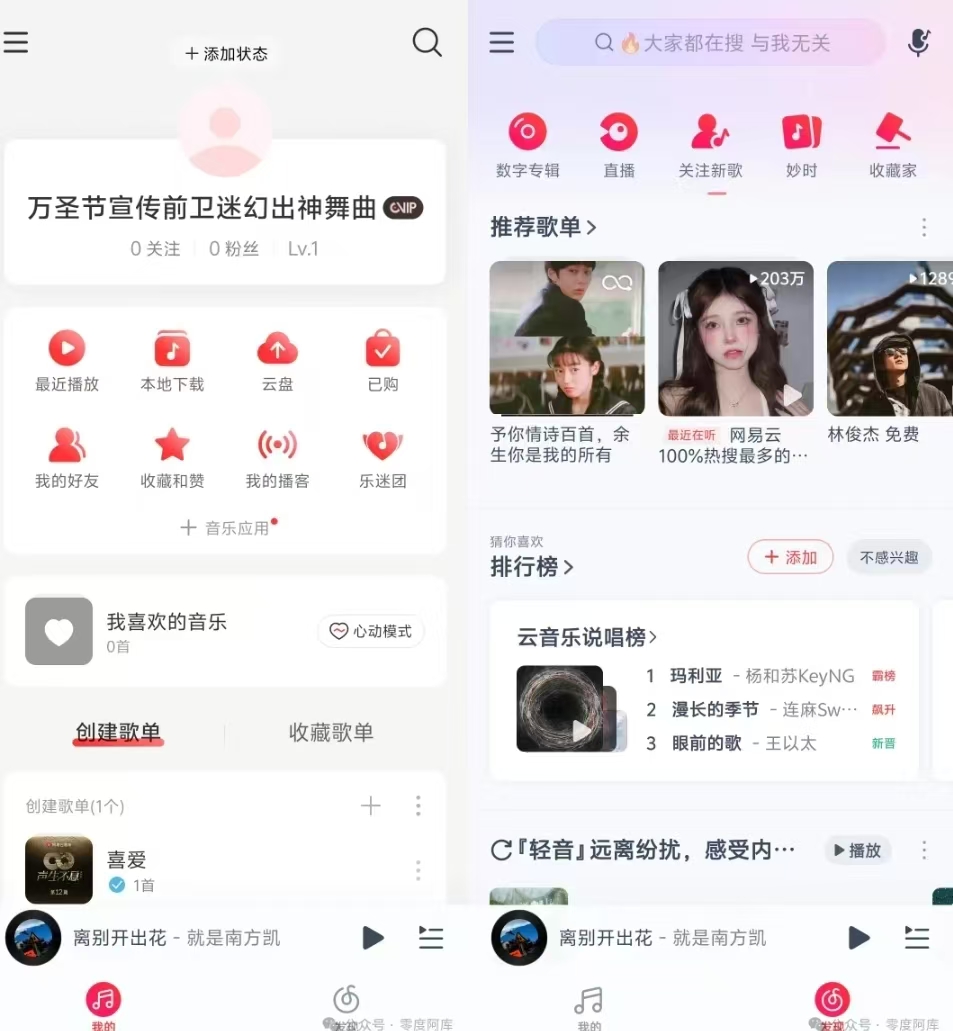
网易云音乐尊享科技版,SVIP会员功能,畅享免费听歌99!

发表于

网易云音乐尊享科技版,SVIP会员功能,畅享免费听歌!

功能拓展:去启动广告/切屏广告精简设置页面解锁会员皮肤、音效精简侧栏去本地音乐上的考拉广告去升级检测去搜索界面横幅广告去除歌单界面会员推广去第三方推送SDK精简部分权限、服务、活动去发现页横幅点亮黑胶SVIP会员去云村去视频Tab内置了网易云模块,支持一键自由换源,能够轻松解救你的灰色歌单。

软件本体太过强大,所以采用zip文件分享,防止软件损坏,下载完成之后自己解压打开安装使用!

下载链接:https://pan.quark.cn/s/a938596eb961

拿走吱一声!

160441rg9c10sw4azcbza4.jpg

Featured Replies

没有可显示的帖子

创建帐户或登录来提出意见

Account

导航

搜索

Configure browser push notifications

Chrome (Android)
  1. Tap the lock icon next to the address bar.
  2. Tap Permissions → Notifications.
  3. Adjust your preference.
Chrome (Desktop)
  1. Click the padlock icon in the address bar.
  2. Select Site settings.
  3. Find Notifications and adjust your preference.