跳转到内容
View in the app

A better way to browse. Learn more.

彼岸论坛

A full-screen app on your home screen with push notifications, badges and more.

To install this app on iOS and iPadOS
  1. Tap the Share icon in Safari
  2. Scroll the menu and tap Add to Home Screen.
  3. Tap Add in the top-right corner.
To install this app on Android
  1. Tap the 3-dot menu (⋮) in the top-right corner of the browser.
  2. Tap Add to Home screen or Install app.
  3. Confirm by tapping Install.
欢迎抵达彼岸 彼岸花开 此处谁在 -彼岸论坛

音乐宝藏畅听vip,纯净无广告~

发表于

给不了解酷狗概念版的朋友解释一下。这个软件软件官方只有手机客户端,没有PC端,登录送6个月VIP,每天看广告送三小时VIP时长.所以这玩意是配合手机上的酷狗概念版使用的,
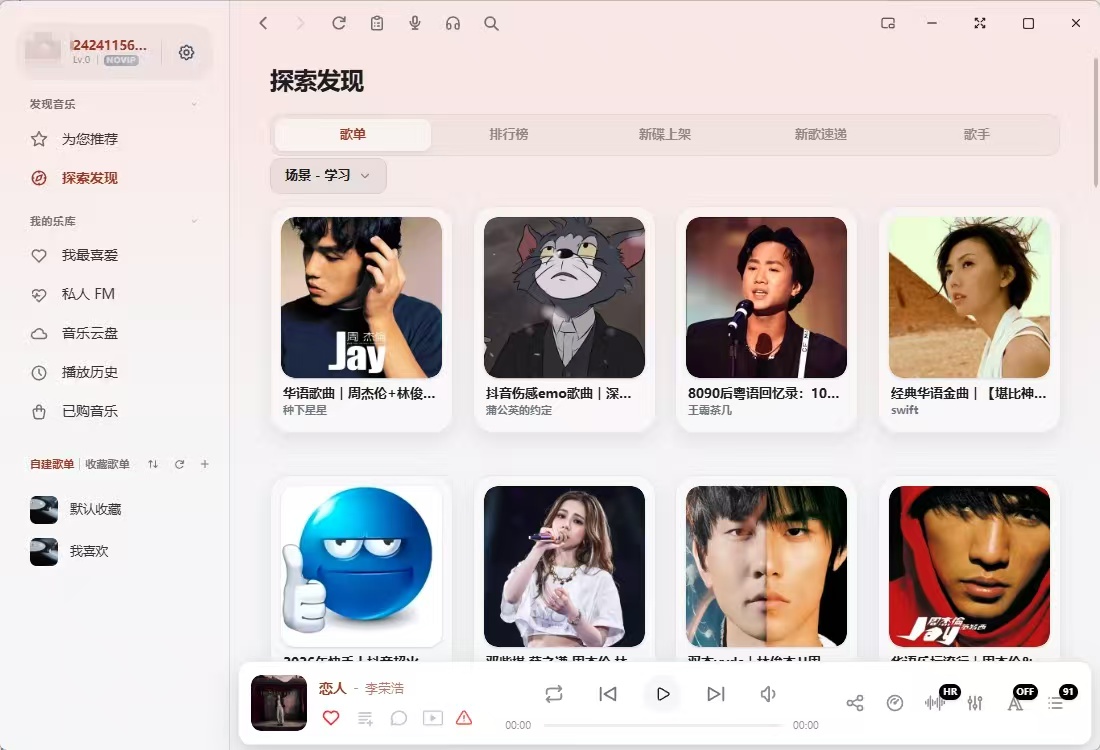
【软件名称】:EchoMusic
【软件大小】:114m
软件版本】:2.3.1
【软件简介】:EchoMusic是一款专为桌面端打造的第三方音乐播放器,最初是「酷狗概念版」的开源实现,如今已长成一个美学和音质都拉满的听歌工具。

下载链接:https://pan.quark.cn/s/115b2835e1fa

拿走吱一声!
175427sq56xx00x156nb5m.jpg

8a1db9c62f333652b9cbe537eb2e6081.jpg (182.97 KB, 下载次数: 0)

下载附件  设为封面

5 秒前 上传

175428ewcatqc0qqt3dqa0.jpg 175428su354477h5r7f557.jpg

Featured Replies

没有可显示的帖子

创建帐户或登录来提出意见

Account

导航

搜索

搜索

Configure browser push notifications

Chrome (Android)
  1. Tap the lock icon next to the address bar.
  2. Tap Permissions → Notifications.
  3. Adjust your preference.
Chrome (Desktop)
  1. Click the padlock icon in the address bar.
  2. Select Site settings.
  3. Find Notifications and adjust your preference.