Num 1 – Infinite Health
Num 2 – Infinite Stamina
Num 3 – Infinite Immunity
Num 4 – Infinite Weapon Durability
Num 5 – Infinite Crafting Materials
Num 6 – Ignore Crafting Requirements
Num 7 – Ignore Blueprint Upgrade Requirements
Num 8 – Set Game Speed
Num 9 – Super Stamina Damage
Num 0 – Super Damage/One Hit Kill
Num . – Damage Multiplier
Num + – Defense Multiplier
Alt+Num 1 – Infinite Ammo
Alt+Num 2 – No Reload
Alt+Num 3 – Super Accuracy
Alt+Num 4 – No Recoil
Alt+Num 5 – Freeze Challenge Timer
Alt+Num 6 – Set Sprint Speed
Alt+Num 7 – Set Jump Height
Alt+Num 8 – Stealth Mode
查看文件
消逝的光芒2 Dying Light 2 Stay Human Trainer修改器
名称:Dying Light 2 Stay Human Trainer
版本:v1.0.3-v1.17.1
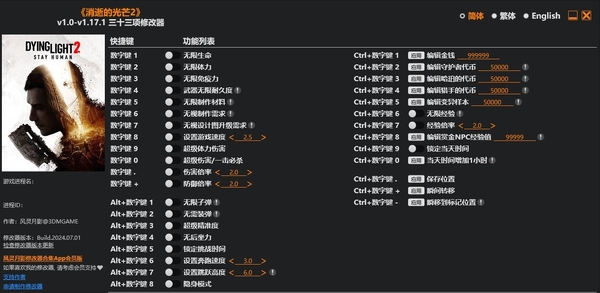
Num 1 – Infinite Health
Num 2 – Infinite Stamina
Num 3 – Infinite Immunity
Num 4 – Infinite Weapon Durability
Num 5 – Infinite Crafting Materials
Num 6 – Ignore Crafting Requirements
Num 7 – Ignore Blueprint Upgrade Requirements
Num 8 – Set Game Speed
Num 9 – Super Stamina Damage
Num 0 – Super Damage/One Hit Kill
Num . – Damage Multiplier
Num + – Defense Multiplier
Alt+Num 1 – Infinite Ammo
Alt+Num 2 – No Reload
Alt+Num 3 – Super Accuracy
Alt+Num 4 – No Recoil
Alt+Num 5 – Freeze Challenge Timer
Alt+Num 6 – Set Sprint Speed
Alt+Num 7 – Set Jump Height
Alt+Num 8 – Stealth Mode
Ctrl+Num 1 – Edit Money
Ctrl+Num 2 – Edit Watcher Tokens
Ctrl+Num 3 – Edit Harper’s Tokens
Ctrl+Num 4 – Edit Hunter’s Tokens
Ctrl+Num 5 – Edit Mutation Samples
Ctrl+Num 6 – Infinite XP
Ctrl+Num 7 – XP Multiplier
Ctrl+Num 8 – Edit Bounty Agent’s XP
Ctrl+Num 9 – Freeze Daytime
Ctrl+Num 0 – Daytime +1 Hour
Ctrl+Num . – Save Location
Ctrl+Num + – Teleport
Ctrl+Num – – Teleport to Waypoint