跳转到内容
View in the app

A better way to browse. Learn more.

彼岸论坛

A full-screen app on your home screen with push notifications, badges and more.

To install this app on iOS and iPadOS
  1. Tap the Share icon in Safari
  2. Scroll the menu and tap Add to Home Screen.
  3. Tap Add in the top-right corner.
To install this app on Android
  1. Tap the 3-dot menu (⋮) in the top-right corner of the browser.
  2. Tap Add to Home screen or Install app.
  3. Confirm by tapping Install.
欢迎抵达彼岸 彼岸花开 此处谁在 -彼岸论坛

[分享创造] [自荐+更新] Chrome 侧边栏 tab 管理插件 —— vTab 3.0

发表于

作为一个开了上百个 tab 的人,我实在受不了在小按钮中切换 tab 的痛苦,所以我做了一个可以直接在页面中嵌入侧边栏的 tab 管理器,叫 vTab,管理和切换 tab 非常方便,并在近期增加了自动冻结和自动归档的功能,希望大家喜欢,也欢迎大家沟通。

功能列表:

  • 在任意网页中通过 vTab 侧边栏管理标签页(查看、切换、关闭、新建、搜索)
  • 冻结单个标签页和冻结窗口中的所有标签页(可释放内存);
  • 按冻结状态排序(将未冻结的标签页排在顶部,以便轻松访问);
  • 将 vTab 侧边栏固定在页面左侧(或右侧);
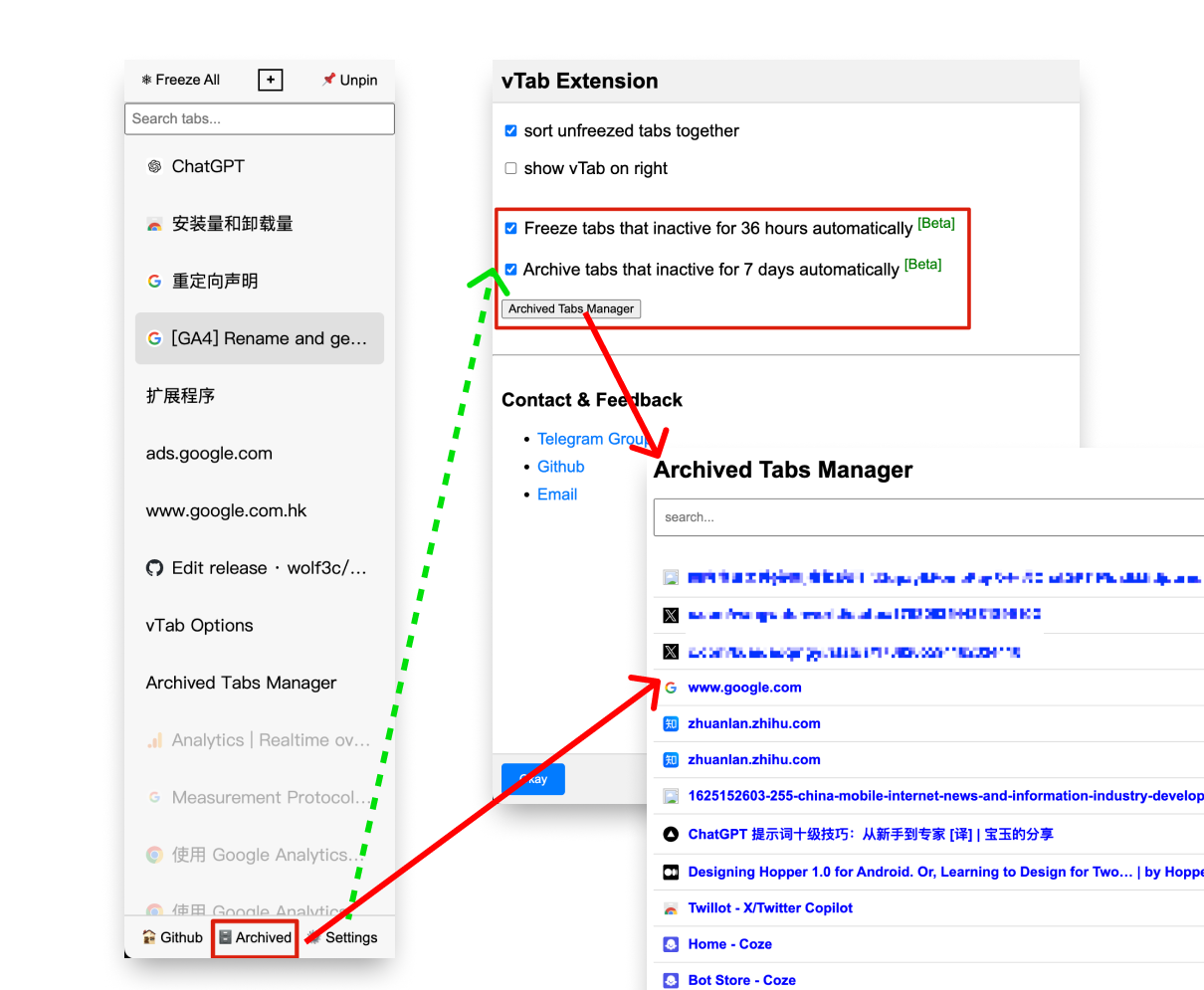
  • 3.0 新功能:自动冻结 36 小时未活跃的选项卡;
  • 3.0 新功能:自动归档 7 天未活跃的选项卡;

3.0 新功能介绍: 1720508699687.png

安装地址: Chrome web Store

交流群:Telegram Group vtab users

Featured Replies

No posts to show

创建帐户或登录来提出意见

Configure browser push notifications

Chrome (Android)
  1. Tap the lock icon next to the address bar.
  2. Tap Permissions → Notifications.
  3. Adjust your preference.
Chrome (Desktop)
  1. Click the padlock icon in the address bar.
  2. Select Site settings.
  3. Find Notifications and adjust your preference.