跳转到内容
View in the app

A better way to browse. Learn more.

彼岸论坛

A full-screen app on your home screen with push notifications, badges and more.

To install this app on iOS and iPadOS
  1. Tap the Share icon in Safari
  2. Scroll the menu and tap Add to Home Screen.
  3. Tap Add in the top-right corner.
To install this app on Android
  1. Tap the 3-dot menu (⋮) in the top-right corner of the browser.
  2. Tap Add to Home screen or Install app.
  3. Confirm by tapping Install.
欢迎抵达彼岸 彼岸花开 此处谁在 -彼岸论坛

[Apple] Safari 后台一天下载了 950G

发表于
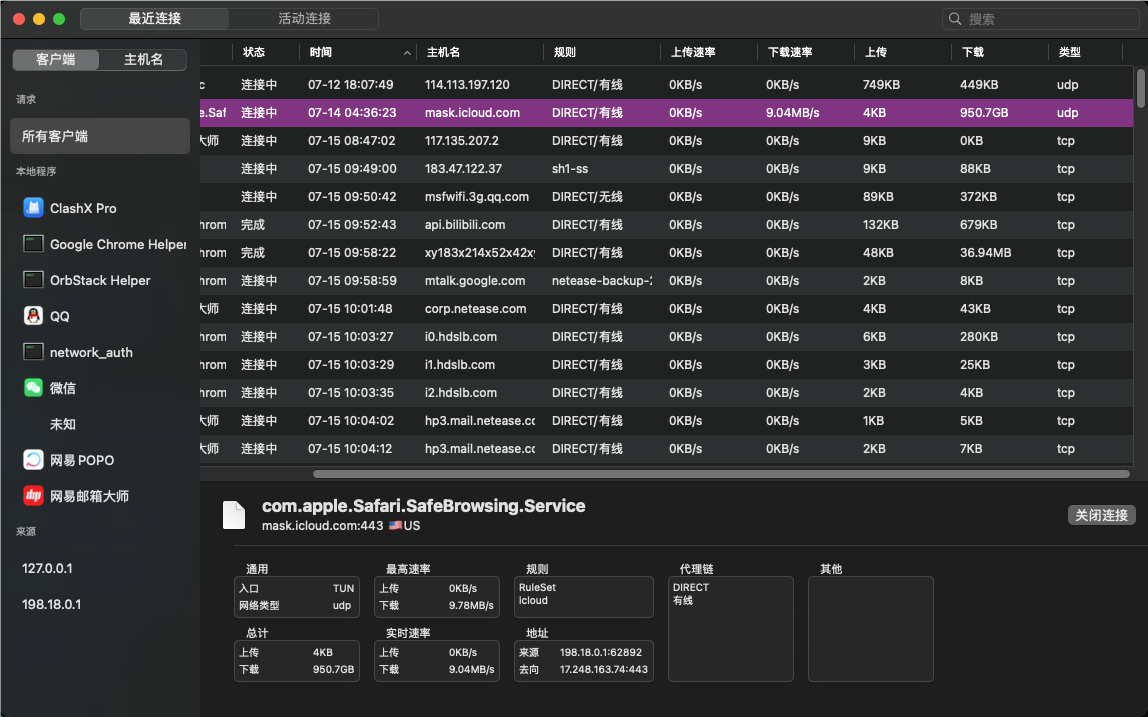
一个平常的周末过去了,今天来到公司打开电脑办公,突然发现 iStat 网速监控显示下载速度 9MB/s ,遂查看 clashX 自带的统计
![]( https://static.dawnnnnnn.com/2024/07/0d88201d71b253af68ec175a1d2828c8.png)

一看这进程从周日的凌晨四点多启动,一直下载到今天,已经下载了 950G 了。搜了搜也有相关的 topic ,但这个 bug 已经至少七年了....

值得一提的是,我从来不用 Safari

Featured Replies

No posts to show

创建帐户或登录来提出意见

Configure browser push notifications

Chrome (Android)
  1. Tap the lock icon next to the address bar.
  2. Tap Permissions → Notifications.
  3. Adjust your preference.
Chrome (Desktop)
  1. Click the padlock icon in the address bar.
  2. Select Site settings.
  3. Find Notifications and adjust your preference.
