跳转到内容
View in the app

A better way to browse. Learn more.

彼岸论坛

A full-screen app on your home screen with push notifications, badges and more.

To install this app on iOS and iPadOS
  1. Tap the Share icon in Safari
  2. Scroll the menu and tap Add to Home Screen.
  3. Tap Add in the top-right corner.
To install this app on Android
  1. Tap the 3-dot menu (⋮) in the top-right corner of the browser.
  2. Tap Add to Home screen or Install app.
  3. Confirm by tapping Install.
欢迎抵达彼岸 彼岸花开 此处谁在 -彼岸论坛

[前端开发] [求助]频繁切换分支造成的困扰

发表于

背景:

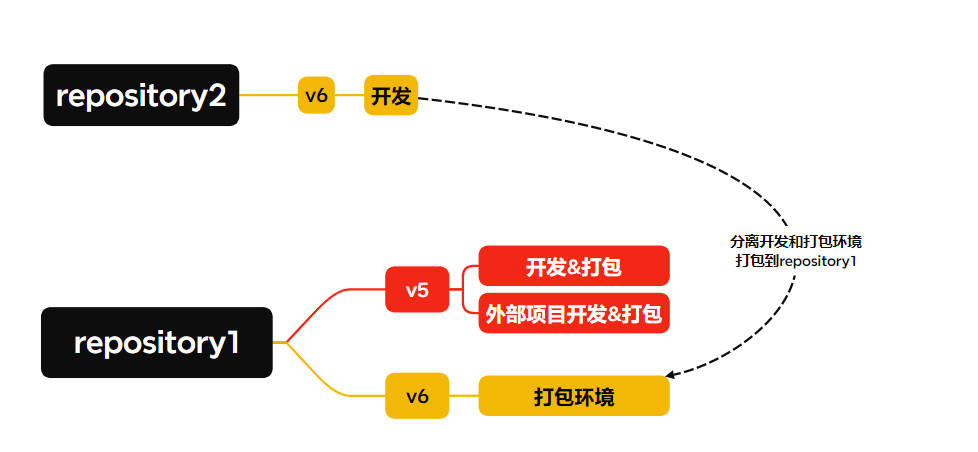
  • 老版开发和打包都在同一个 A 仓库下,build 后的资源要提交到 A 仓库中。
  • 新版拆分了打包和开发环境,原 A 仓库会被其他业务引用,依旧作为打包环境,新仓库 B 作为开发环境,打包结果存入 A 仓库中。

问题:

  • 目前要在 v5 开发,又要兼顾 v6 打包,现在的操作很麻烦,要先 npkill 删依赖,然后切到 v6 打包分支,然后再去 B 仓库打包,搞完了又重新切到 v5 分支装依赖跑

现在希望这个环节,能把这个依赖管理起来,不用每次频繁 npkill & npm install

已知的方法是无脑建 clone 两份,请问还有没有什么好办法。

如图: 1

Featured Replies

No posts to show

创建帐户或登录来提出意见

Configure browser push notifications

Chrome (Android)
  1. Tap the lock icon next to the address bar.
  2. Tap Permissions → Notifications.
  3. Adjust your preference.
Chrome (Desktop)
  1. Click the padlock icon in the address bar.
  2. Select Site settings.
  3. Find Notifications and adjust your preference.