发表于 2024年7月25日1年前 有时由于一些原因需要登录老版本的微信(比如新版本的抓包限制?),这时就需要登录低版本微信,但是由于微信登录策略,登录低版本时会提示版本过低: 这时就需要修改微信启动后内存中的版本号了。 下载并安装微信历史版本: https://pan.baidu.com/s/1DTzIO-qjjorLOoH3qfm6EA?pwd=wwyq 以 3.5.0.46 这个版本为例。 去官网下载并安装 Cheat Engine, 打开微信到扫码登录界面,并导入微信进程 查找对话框内输入:0x6305002E 按回车,正常情况下左侧会出现 Wechat.... 的内容(原理:原始版本号 3.5.0.46 转换为 16 进制为:3 => 3 、. => 0 、5 => 5 、. => 0 、0 => 0 、.46 => 2E ,补充前面的 0x6 结果为 0x6305002E ) 假设我们要将版本号 3.5.0.46 改为 3.9.10.18 ,就需要将 内存地址 0x6305002E 修改为 0x63090A12 ,因为同理 3.9.10.18 转换为 16 进制就是 0x63090A12 修改完成,就能登录低版本微信了。需要注意的是,如果退出过微信,每次都要这样操作修改版本号。因为是走的内存修改。 PS:推广一下 https://0.zone 攻击面搜索引擎:搜企业、企业、公众号小程序......
有时由于一些原因需要登录老版本的微信(比如新版本的抓包限制?),这时就需要登录低版本微信,但是由于微信登录策略,登录低版本时会提示版本过低:
这时就需要修改微信启动后内存中的版本号了。
下载并安装微信历史版本: https://pan.baidu.com/s/1DTzIO-qjjorLOoH3qfm6EA?pwd=wwyq 以 3.5.0.46 这个版本为例。
去官网下载并安装 Cheat Engine, 打开微信到扫码登录界面,并导入微信进程
假设我们要将版本号 3.5.0.46 改为 3.9.10.18 ,就需要将 内存地址 0x6305002E 修改为 0x63090A12 ,因为同理 3.9.10.18 转换为 16 进制就是 0x63090A12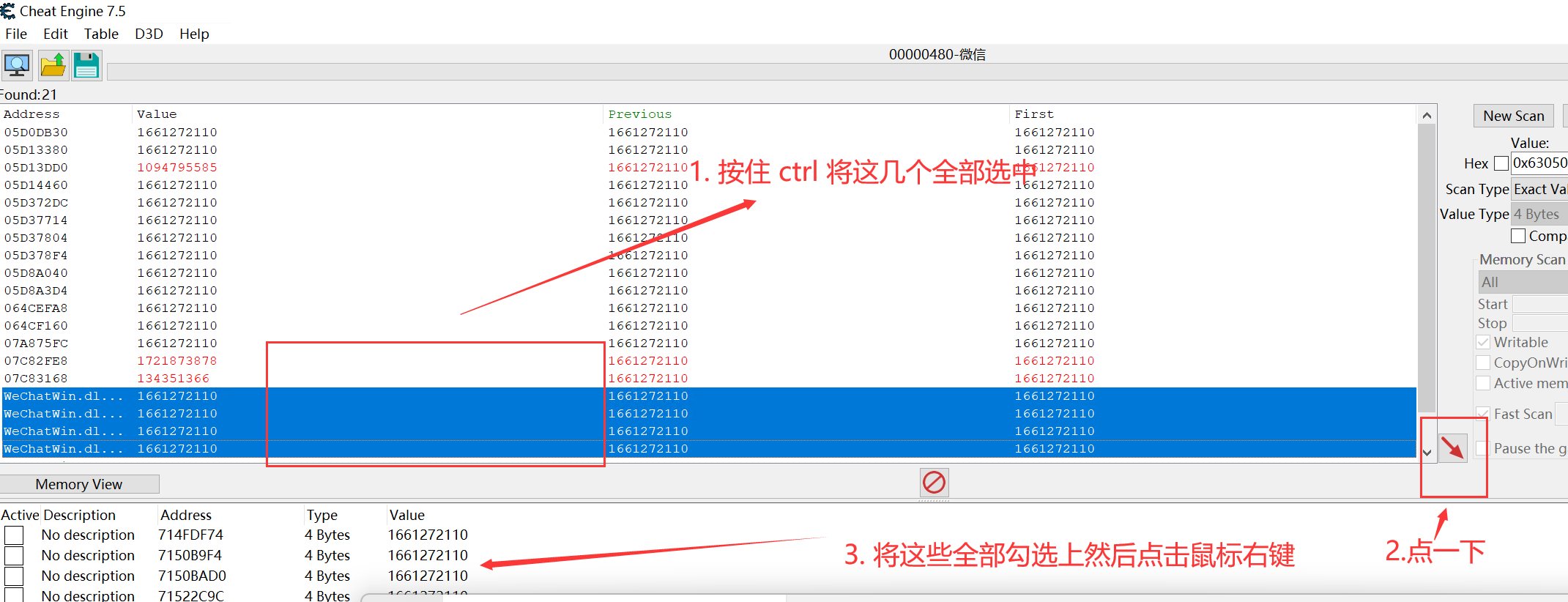
修改完成,就能登录低版本微信了。需要注意的是,如果退出过微信,每次都要这样操作修改版本号。因为是走的内存修改。
PS:推广一下 https://0.zone 攻击面搜索引擎:搜企业、企业、公众号小程序......